Guide
Free AI photo generator right in your chat: five photo jobs we tested and what the free plan covers

Most free AI photo generators give you a few credits, a watermark and a sign-up form. Here the generator is a chat. We gave our test agent five photo jobs in plain words: a realistic photo for a home bakery's Instagram, the same picture as a story, a question about a sick houseplant, a sticker from a dog photo and a new look for a rented living room. Below are the real replies and pictures, and the exact count of how many such jobs the Free plan covers each month, with no card.
The short answer
Yes, you can make and change photos with AI for free, in a chat. Create a WAM agent, write what you want to see the way you would describe it to a friend, and the picture comes back in the same chat in under a minute. Send your own photo with a sentence about it, and the agent answers about it or draws a new version from it.
The Free plan has no card and no end date. It gives 200 in the first month and 100 every month after, and a generated image on the default model costs 20 . That is 10 pictures in your first month and 5 a month after. A question about a photo you send costs 1.5 .
This guide covers what is worth spending those pictures on. If you want to edit one product photo step by step, see Edit a photo with AI right in the chat: one phone shot, three edits, before and after.
What “free” means here
“Free AI photo generator” usually means a trial: three credits, a watermark in the corner, a sign-up wall before the download. The Free plan of WAM Agents works differently. It is the same agent as on Pro with a smaller monthly allowance of magnets (), the units the agent spends when it reads, searches or draws.
Here is what the photo jobs from this article cost, by the pricing page on 30 October 2026:
| Photo job | Magnets | First month on Free (200 ) |
|---|---|---|
| A generated image on the default model | 20 | 10 pictures |
| A photo or screenshot read | 1.5 | over 100 photos |
| A reply in the chat | a fraction of a magnet | hundreds of messages |
Nothing is charged for keeping the chat open, and if a call fails on the provider’s side, its magnets come back. The counter is always in front of you: the agent shows the balance in its status line while it works.
The test: five photo jobs in one chat
On 30 October 2026 we gave our test agent five jobs on the default model, the one the Free plan runs on. The person behind the requests is made up: someone who bakes at home, keeps a monstera, has a corgi and rents a small flat. The photos of the plant, the dog and the room are ordinary phone-style shots we generated for the test, so they show no real home. The replies and the pictures the agent sent back are real and quoted as they arrived.
1. A realistic photo from a description
The first job is the one people search for most: a photo of something you can describe but have no picture of. For a home bakery that is a post for Instagram.
The picture arrived 26 seconds after the request.
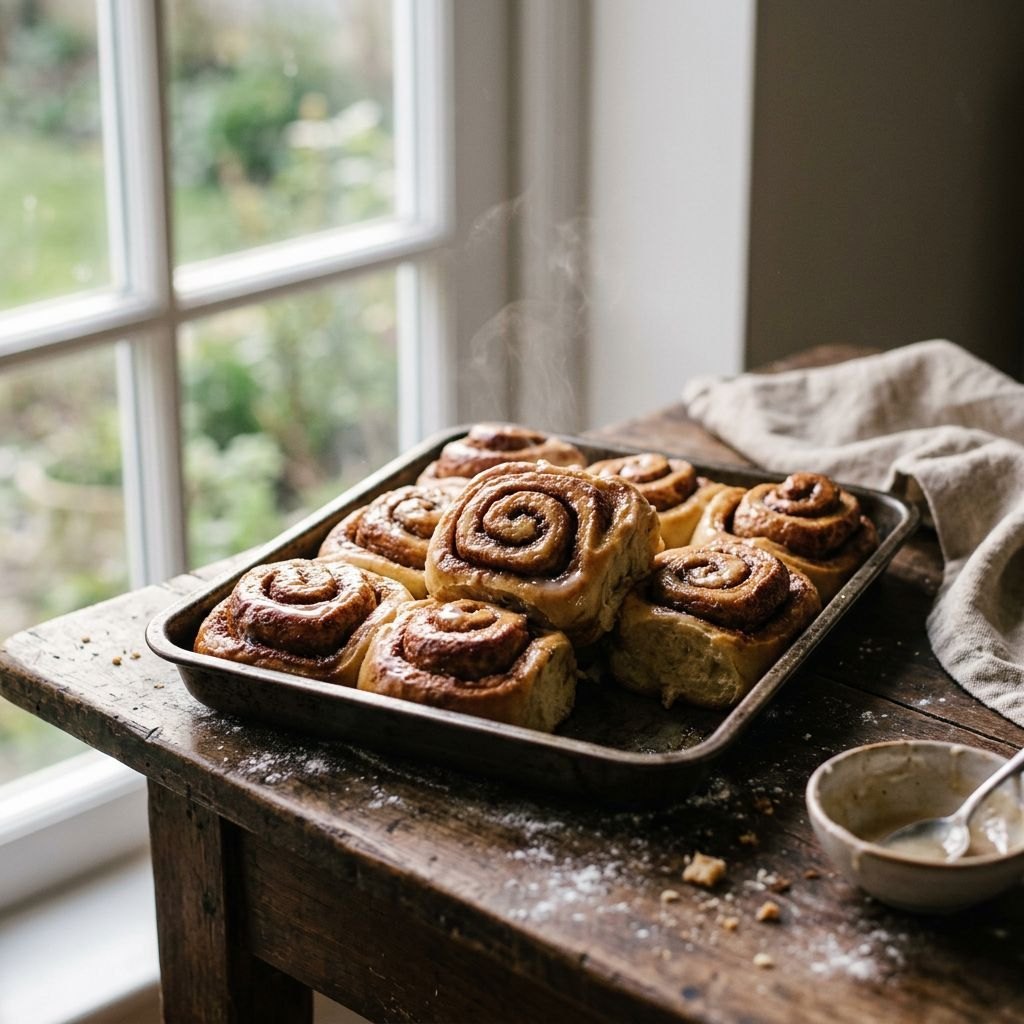
Everything from the request is in the frame: the tray, the wooden table, the window, the soft light and the flour. The agent added what a food photographer would: a wisp of steam, crumbs, a linen towel and a bowl of glaze with a spoon. Look at the crumbs and the flour at the front: they lie the way flour lies on a table, not as a pattern. That is the difference between “a real photo, not a drawing” and the glossy look many generators fall into.
The agent also offered three variations a baker would actually use: a close crop of one bun, evening light, a hand pulling a bun from the tray. One more message each.
2. The same picture in a format for stories
A square works in a feed. Stories want a tall picture with room for your own words. Send the picture back and ask for the new format, and say what has to stay the same.
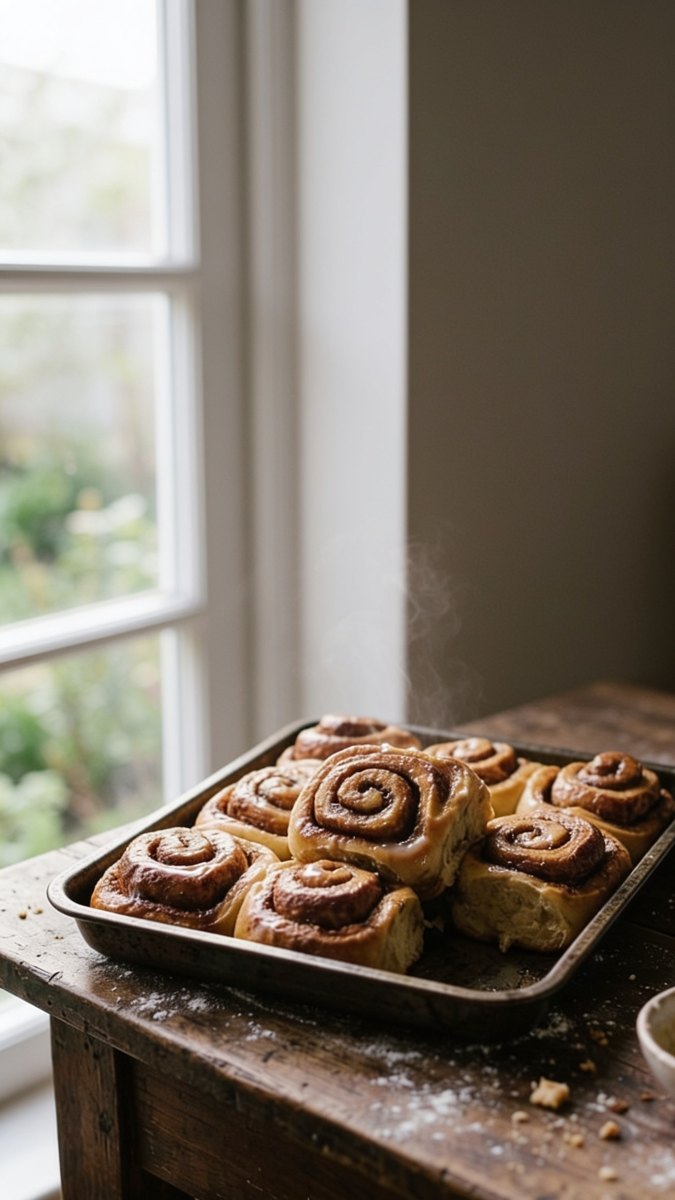
82 seconds, and the picture is exactly the size a phone screen wants for a story, 1440 by 2560 pixels. The tray, the buns, the glaze, the flour and the crumbs are the ones from the square picture. The top half is a soft window and a plain wall, the kind of background where white or dark text reads well. The agent kept the space clean of any lettering, so the text you add later is the only text in the frame.
Look at the bottom of the frame too: the flour, the crumbs and the edge of the glaze bowl are where they were. That is what “the same buns” means in practice. If you post the square in the feed and the tall one in stories on the same day, they look like one shoot.
3. Ask about a photo you took
Not every photo job ends with a new picture. Sometimes you want an answer about the photo itself: what is this, what is wrong with it, what to do. This is the cheapest photo job on the Free plan, 1.5 to read the photo.
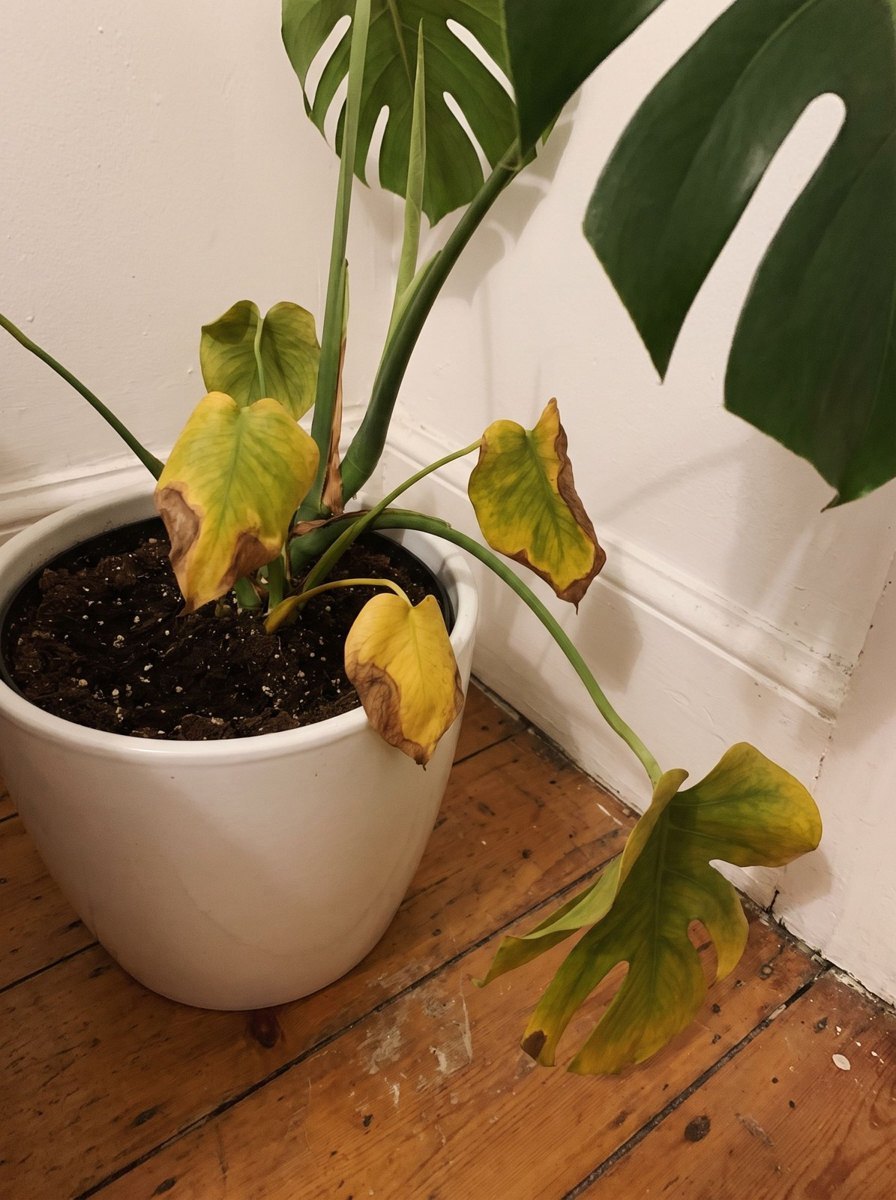
The answer came back in 22 seconds. The agent read the photo the way a plant shop assistant would: which leaves are yellow (the oldest ones), how the edges look (dry and papery), what the soil says (dark and wet). From those three signs it named the likely cause and gave a plan in the order you would do it. The question at the end is the right one: whether the pot drains decides between changing the watering and repotting this week.
The same move works for anything you can photograph: a patch of mould on a wall, a label in a language you don't read, a dashboard light in the car, a screenshot of an error. One photo, one question, 1.5 for the reading.
4. A sticker from your own photo
Now the agent takes your photo as the starting point and draws something new from it. A pet photo into a sticker is one of the most common requests of this kind.
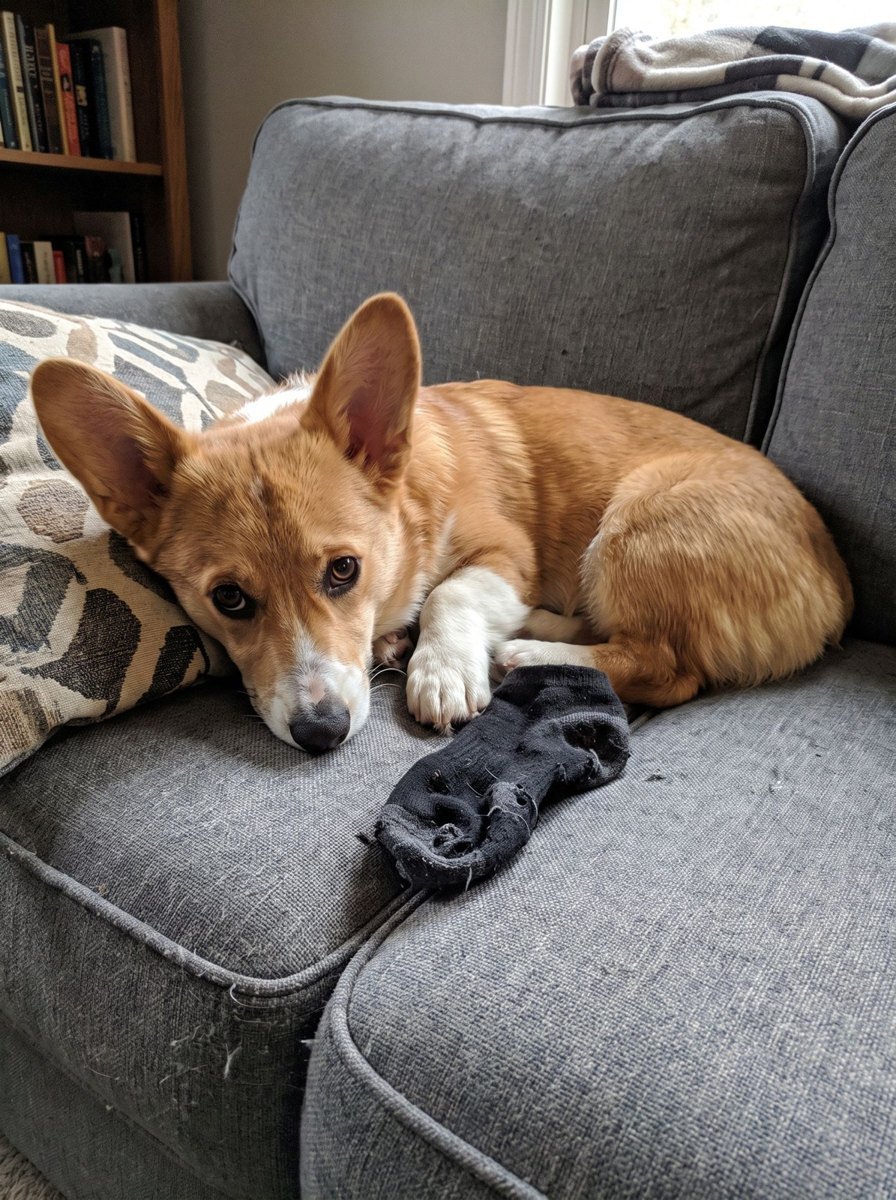
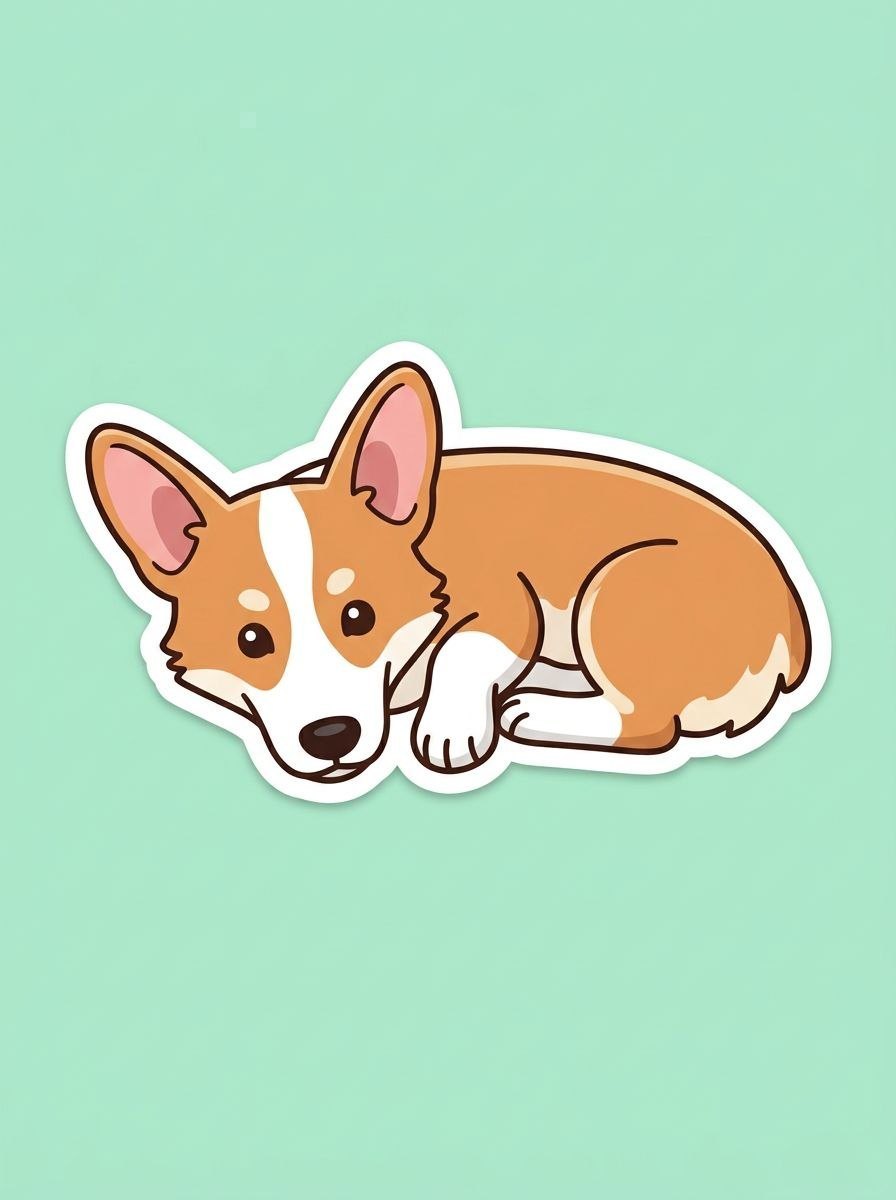
56 seconds. The pose is the one from the photo: lying down, head low, front paws together. So are the markings that make this dog this dog: the white stripe between the eyes, the white muzzle and chest, the white front paws, the big ears with pink insides. The agent named those details itself, plus “that guilty look”, which is the whole point of the original photo. The sock stayed on the sofa, as asked: only the dog.
The same request works for a cat, a horse or your own drawing from childhood. Telegram’s own sticker bot takes a PNG of 512 pixels on the long side, so if you want a real sticker pack, ask the agent for the file in that size.
5. A new look for a room from a phone photo
The last job mixes both sides: the agent has to keep what is real in your photo and change the rest. A rented room is a good test, because the big furniture stays.
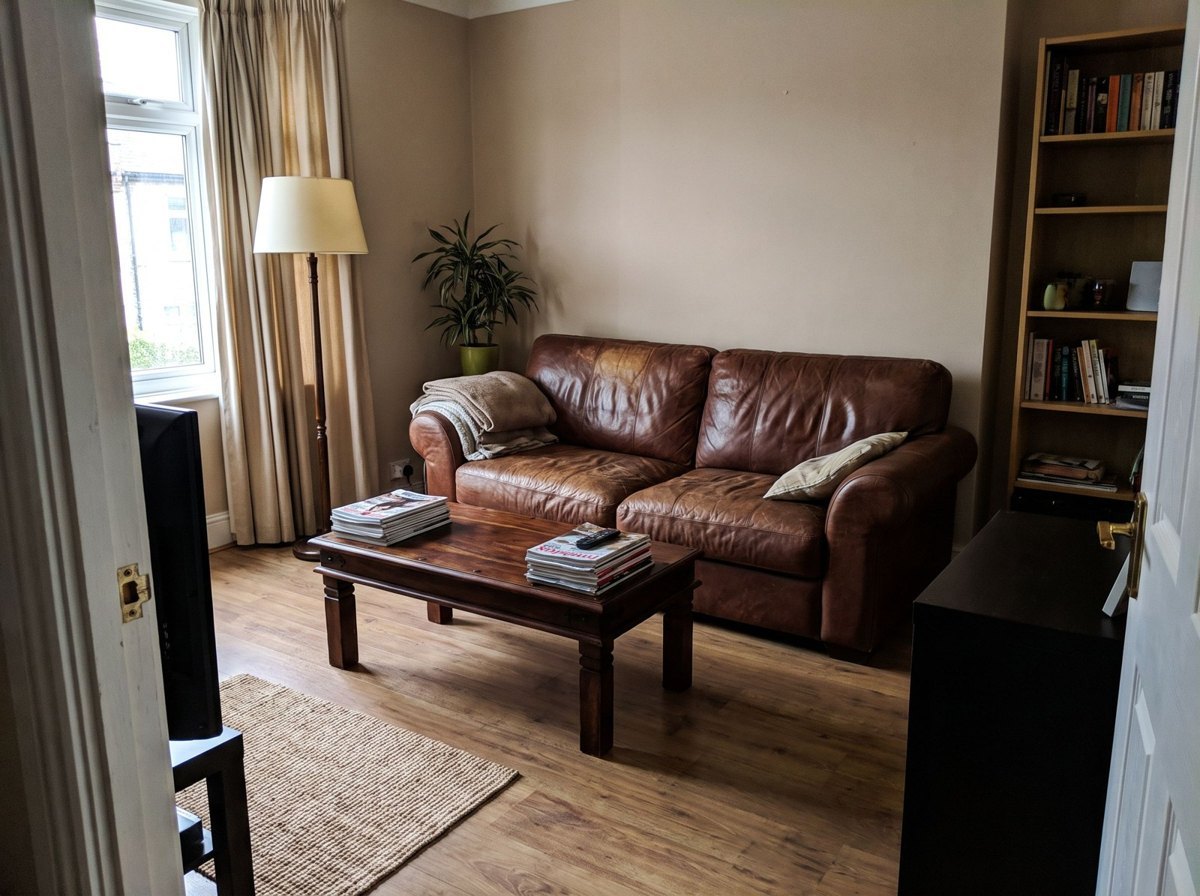
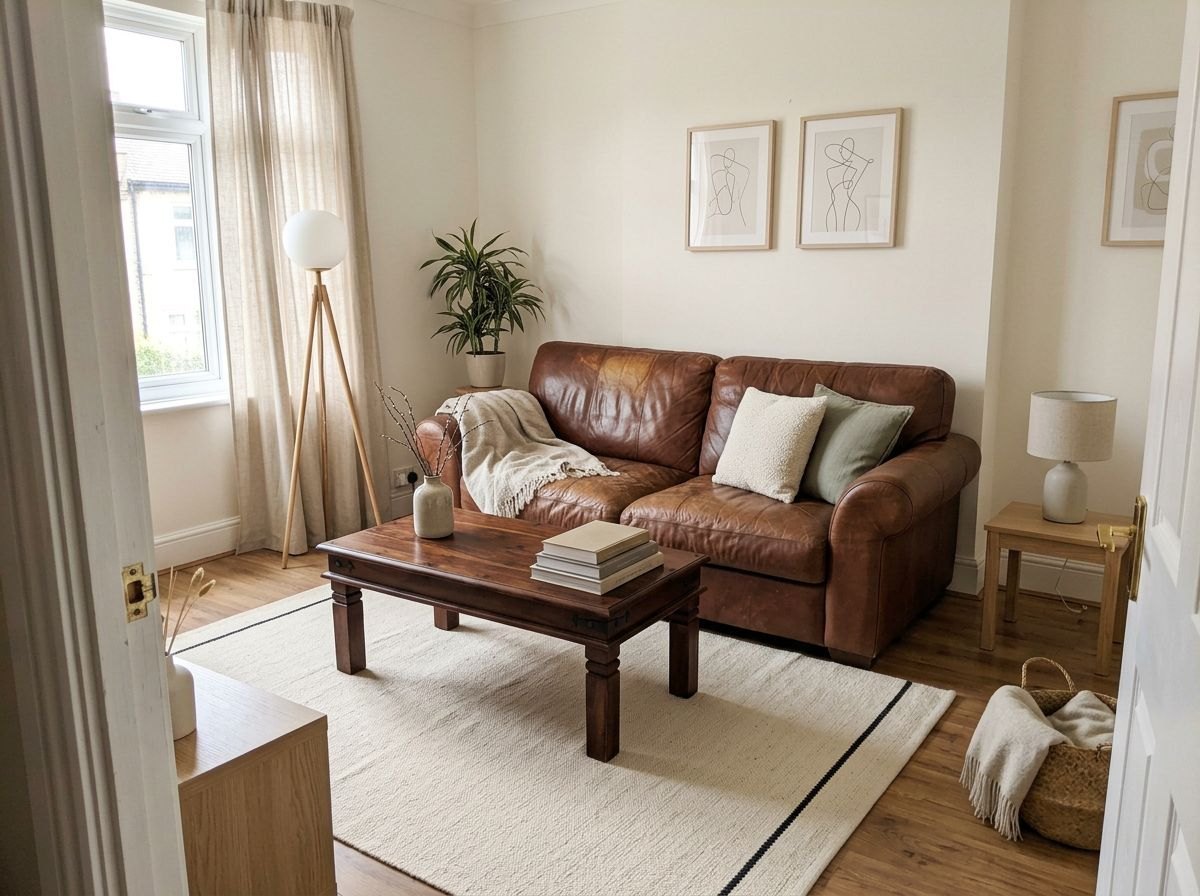
The room is recognisably the same: the window on the left, the leather sofa, the dark coffee table, the doorway the photo is taken from. What changed is what a tenant can change: curtains, rug, cushions, a throw, two lamps, prints on the wall. The reply turns the picture into a shopping list, item by item, and adds the advice that matters most in a rental: ask the landlord about paint, everything else leaves with you.
The agent also checked its own render against the photo and pointed out the two pieces of furniture the picture added, with an offer to redraw without them. When you use a picture like this to plan purchases, that is exactly the check to ask for: “list everything that is in the new picture and not in my photo”.
Making a new picture or changing your own
The five jobs fall into two kinds. In the first two, the agent made a picture of something that did not exist: buns on a tray. In the last three, it started from your photo: it read it, drew a sticker from it, restyled it. On the Free plan both cost the same, 20 per picture, and reading your photo adds 1.5 .
They answer different needs. A made-up picture is for a post, an idea, a mood. A picture from your photo has to stay true to it: your dog, your room, your product. That is why we keep two more guides next to this one. For six prompts and the pictures they made, see An AI image generator inside your chat: six prompts and the pictures they made. For careful edits of your own photo, with before and after, see Edit a photo with AI right in the chat: one phone shot, three edits, before and after.
How to get the picture you want on the first try
On the Free plan each picture is a tenth of your first month, so it pays to ask well. What worked in this test:
Describe the photo, not the style word. “On a baking tray on a wooden table by a window, soft morning light, a little flour” gave a real-looking photo. A list of style words would have given the glossy look.
Say “a real photo, not a drawing” when you want one. Without it, a generator is free to choose an illustration.
Name the format in the first message. Square for a feed, 9:16 for stories, wide for a banner. Redrawing for a new format costs another picture.
With your own photo, say what must stay. “Keep the sofa, the table and the layout” is the line that made the room picture usable.
Ask the agent to check its picture against yours. It already does this on its own sometimes, as with the room. When you plan to buy or post something, ask for it every time.
Spend the cheap magnets first. A question about a photo is 1.5 . Ask what is wrong, what fits, what to change before you ask for a new picture at 20 .
What stays with you
Your photos and the chat history stay in your agent’s isolated container. To answer, the agent sends requests to the model: on the default model they go through DeepSeek’s infrastructure in the People’s Republic of China, which you confirm during onboarding, and on Pro you can attach your own Claude or Codex. How the agent handles files and data is covered in Is an AI agent safe? 8 things to check before you let one into your chats.
What it costs
We read the balance in the agent’s status line during the test. One picture with its reply took 23 off it: 20 for the picture and the rest for the words. By the rate card, the five jobs in this article come to about 90 : four pictures at 20 , four photos read at 1.5 and the replies. That is under half of the Free plan’s first month.
The rates, as on the pricing page: a generated image on the default model costs 20 , reading a photo or screenshot costs 1.5 . The Free plan gives 200 in the first month and 100 every month after, with no card; the pricing page puts the first month at 10 images on the default model. Pro costs $13.90 a month for 400 , or $1.39 for the first month if you subscribe within 7 days of signing up.
Messages worth copying
Make a realistic photo, not a drawing: [what is in the frame], [where], [what light]. Square format.
Now the same picture as a vertical 9:16 for stories, with empty space at the top for my text.
What is wrong with what you see in this photo, and what should I do, in order?
Turn this photo of my pet into a cartoon sticker: only the animal, a thick white outline, plain background.
Show this room in [a style] without new big furniture: keep the sofa, the table and the layout.
Create your agent, send it the photo you were about to fix or the picture you were about to search for, and spend your first 20 on it.
Try it with your own agent
Free, no card. The agent starts working in the chat straight away.
Create your AI agentQuestions
Is it really free, or is there a catch after the trial?
The Free plan has no end date and asks for no card. It gives 200 in the first month and 100 every month after. A generated image on the default model costs 20 , so the first month covers up to 10 pictures and every month after up to 5. What you don’t spend on pictures stays for questions and text.
How many photos can I make for free?
On the default model a picture costs 20 . That makes 10 pictures in the first month and 5 a month after that. Asking the agent about a photo you send costs 1.5 , so questions about photos fit in by the dozen.
Will the photos have a watermark?
The pictures in our test came back clean: no watermark, no logo, no caption. They arrive as ordinary photos in the chat, so you save or forward them the way you do with any picture from a friend.
Can it change my own photo, or only make new ones?
Both. In this test the agent drew a sticker from a dog photo and restyled a living room from a phone shot. For a step-by-step guide to editing your own picture without changing the product or the face, see our separate case on photo edits.
Do I need to sign up on a website or install an app?
No. The agent starts in Telegram, and other messengers can be connected. You create it in a minute, write to it like a contact and send photos the way you send them to a friend.
What size are the pictures?
In our test the square picture came back at 1024 by 1024 pixels, the story version at 1440 by 2560, and the sticker and the room at 896 by 1200 and 1200 by 896. Say the format you need, square, vertical for stories or wide, and the agent draws in it.