Chat case
Edit a photo with AI right in the chat: one phone shot, three edits, before and after

Most AI photo tools want you to upload, sign up and learn a panel of sliders. Here the photo goes into a chat and the edit comes back as a reply. We sent our test agent an ordinary phone shot of a handmade mug on a messy kitchen table and asked for three changes in plain words: clear the clutter, put the mug on a studio background, give it morning light. Each version arrived in under a minute. Below are the real replies, the pictures before and after, the cost and how to word an edit so the rest of the photo stays put.
The short answer
Send the photo to the agent and say, in one sentence, what to change and what to keep. “Remove the cable and the keys, keep the mug exactly as it is” is a complete request. The edited picture comes back in the same chat, usually in under a minute.
Then keep going in the same conversation. Ask for the next change from the version you like: a studio background for a listing, warmer light for a post, a square crop for a marketplace. Each reply is a new version, and the earlier ones stay in the chat, so you can always go back.
This guide is about changing a photo you already have. If you need a picture from scratch, see An AI image generator inside your chat: six prompts and the pictures they made.
The test: a handmade mug on a messy kitchen table
Here is the most common reason to edit a photo: you made or sold something, took a picture at home, and the picture shows your home more than your product. Ours is a sage-green handmade mug on a saucer, shot on a kitchen table on a grey morning. On the table: a phone charger cable, a bunch of keys and a paper napkin. Behind: a dish rack, a kettle and paper towels.
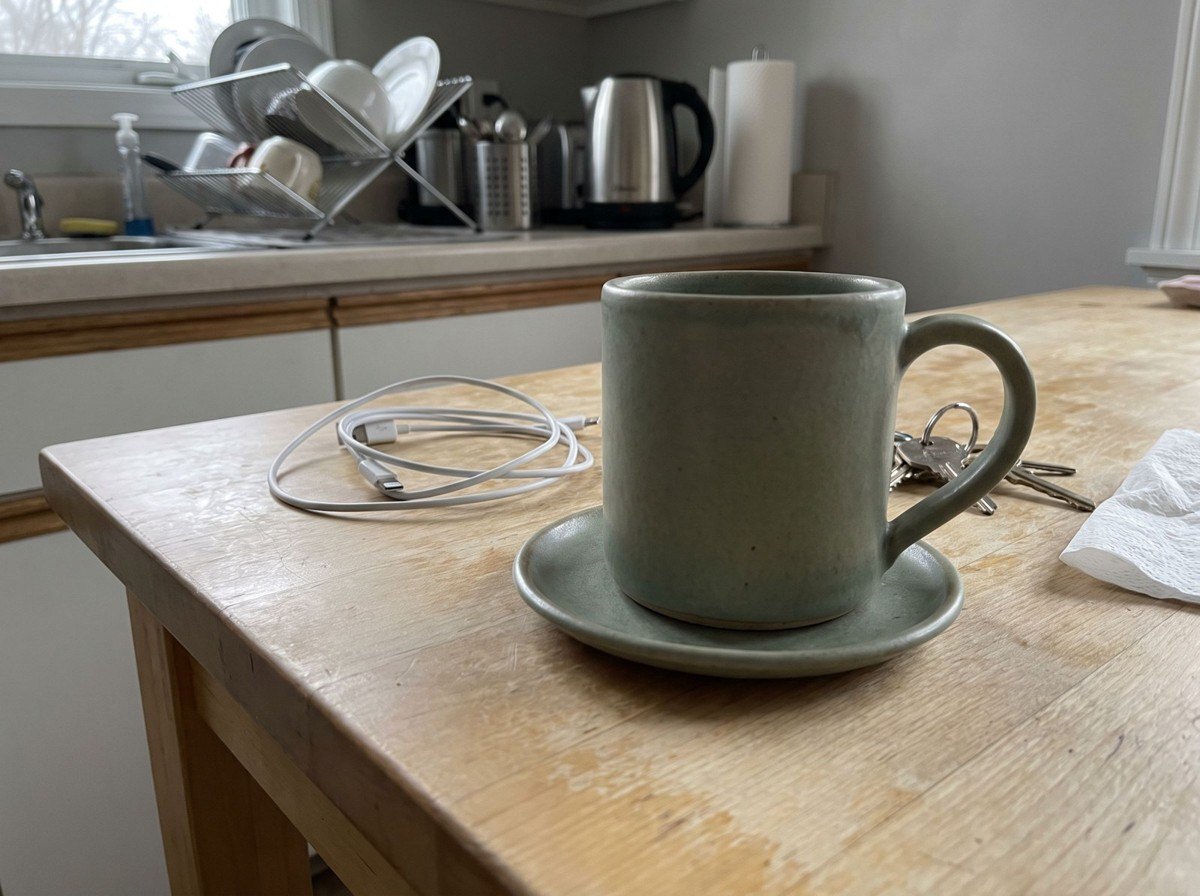
We generated the photo ourselves for this test, so it shows no real person and no real kitchen. Everything after it is real: on 30 October 2026 we sent it to our test agent on the default model and asked for three edits in one chat, in plain words, the way you would ask a friend who is good at photo editing.
Step 1. Remove what should not be in the frame
Start with the edit that changes the least. Name each object to remove and say what must stay. The second half matters as much as the first: it tells the agent where its work ends.
The edited photo came back 43 seconds after we sent the request.
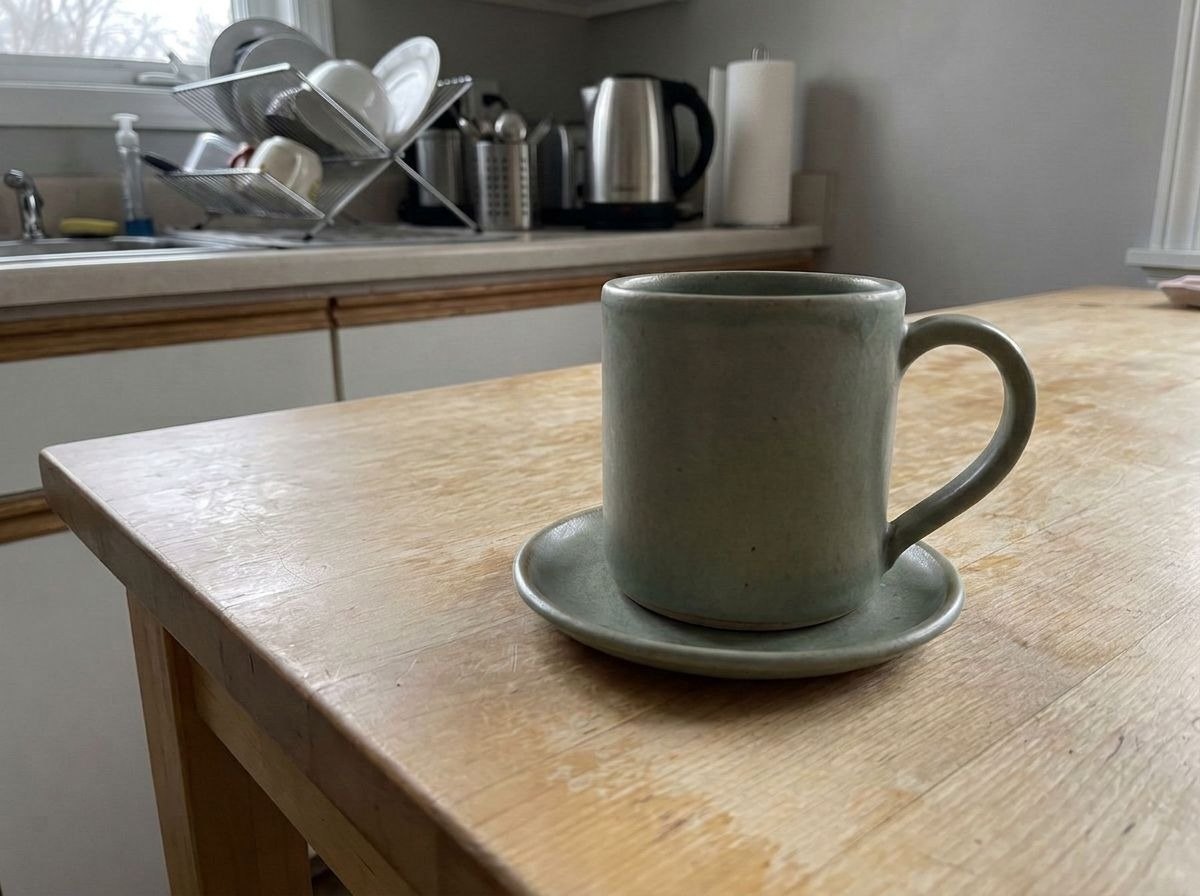
Look at where the keys used to lie, to the right of the handle. The wood grain continues through that spot, with the same scratches and pale patches as the rest of the table, so there is no smudge where an object used to be. The kitchen behind, the light and the angle are as they were. The mug kept its speckles, its matte glaze and the exact curve of the handle.
In a second message the agent offered more versions for the listing: different crops, a plain background, a warmer shot. That was exactly our next step.
Step 2. Replace the background for a listing
A marketplace photo has different rules from a photo for friends. The buyer should see only the product, on a neutral background, with a shadow that shows it stands on something. Say all three in the request.
27 seconds. This is the edit that would take the longest by hand: cutting out a mug with a handle, the gap inside the handle included, and building a shadow that looks real.
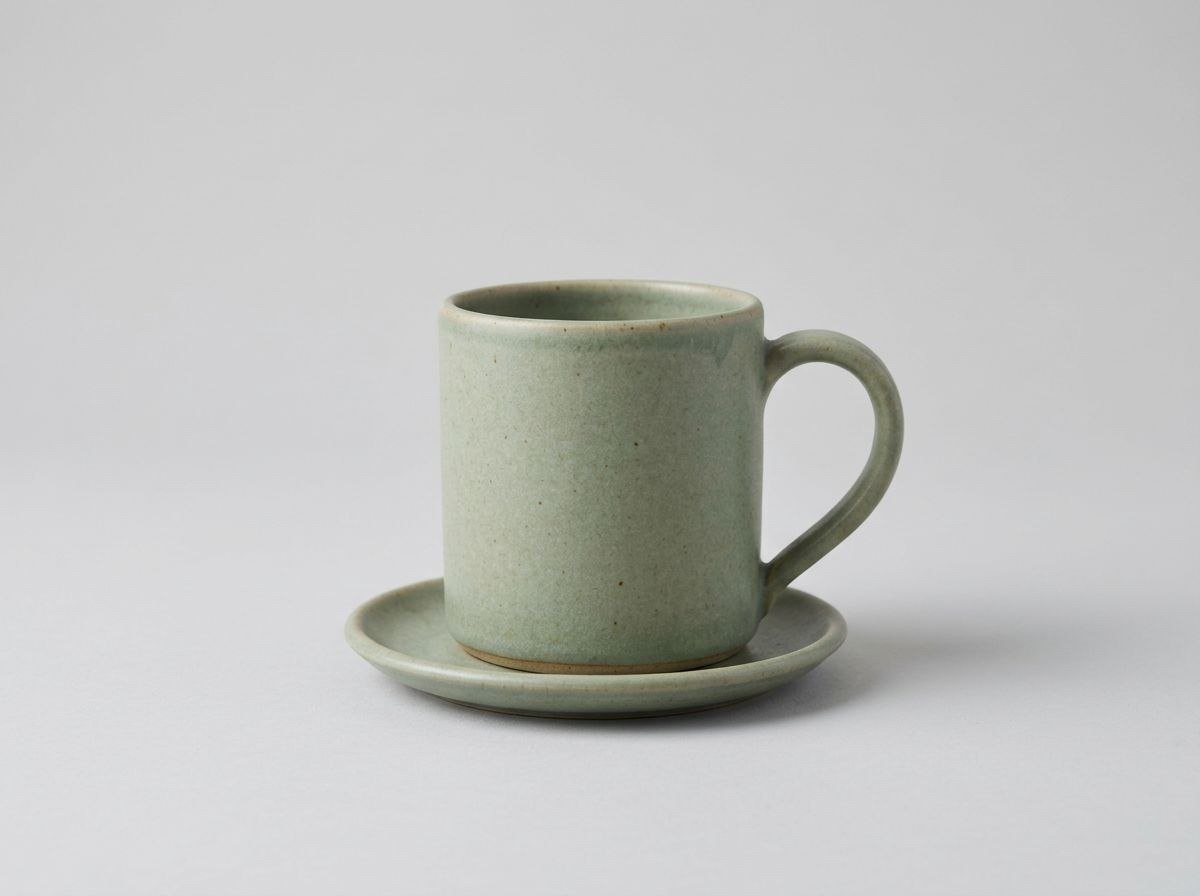
The agent did more than swap the backdrop. It turned the shot into a proper studio frame: the mug sits in the centre, the camera is at table height and the light-grey background runs seamlessly from the surface into the wall. The glaze, the dark speckles and the unglazed foot ring of the mug are all there. Then it gave a piece of advice worth having before you upload anything: most marketplaces want a square image, and a listing usually needs three photos. One more message and you have the set.
Step 3. Change the light and the mood
The third edit goes back to the kitchen photo without the clutter. A listing needs a clean product shot. A post or a shop banner needs a mood, and light changes the mood more than anything else in a photo.
28 seconds. Note the first words of the request: “from the kitchen photo without the clutter”. The chat now held three pictures, and that phrase told the agent which one to start from.
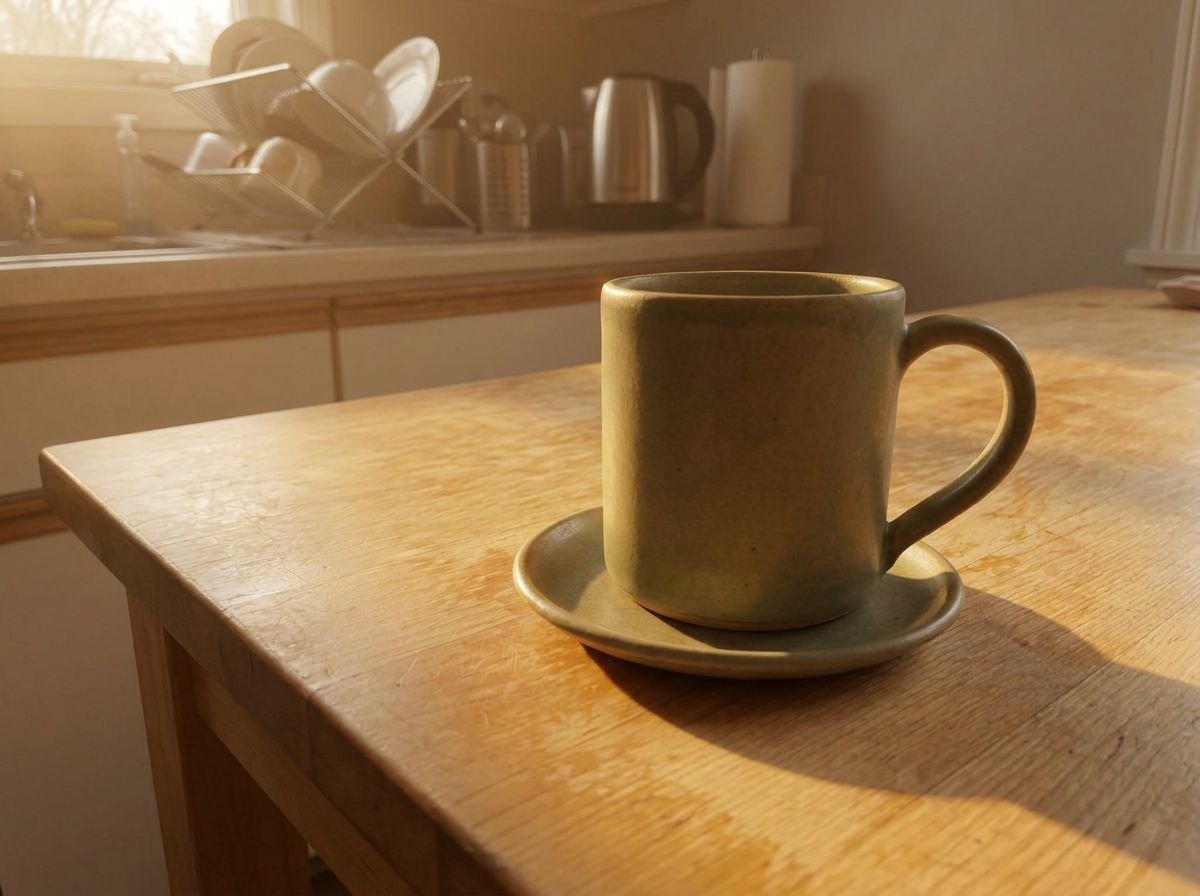
The grey morning became a golden one. The sun comes in through the window, glows on the dish rack and the kettle, warms the wood and throws a long shadow of the mug and saucer to the right, the way low sun does. The mug stands in the same spot, at the same angle, with the same shape. The table stayed clear: the edit from step 1 carried over. And the agent closed the case by offering what a seller needs next: three versions sized to the marketplace and named so they upload in the right order.
What we got from one phone photo
Three requests, three replies, under two minutes of the agent's work in total. From a cluttered kitchen shot we got three pictures for three jobs:
- a clean version of the original photo, for a message or a post where home is part of the story;
- a studio shot on light grey, for the main image of a listing;
- a warm morning scene, for a shop banner, a social post or a story.
Nothing was installed. There was no upload page, no brush to paint a mask, no slider to find. Each change was one sentence, and each answer came back as a picture in the same chat as the rest of the conversation.
How to word an edit so the rest stays put
The agent changes what you ask for. The way you ask decides how much else changes with it. A few habits from this test that carry over to any photo:
Say what to keep, not only what to change. “Keep the mug, the saucer and everything else exactly as they are” draws a line around the edit. Without it, an editor that is free to improve the picture may improve more than you wanted.
One change per message. Clearing the table, swapping the background and relighting the scene were three requests, not one. Each result is easy to check, and if one step needs another try, the others stay as they are.
Name the version you start from. Once a chat has several pictures, say which one is the base: “from the kitchen photo without the clutter”, “from the studio version”. Replying to the picture itself in Telegram works too.
Say what the photo is for. “Like a marketplace listing” brought a neutral background, a centred mug and a contact shadow, with no list of technical words. “A cosy breakfast mood” did the same for the light.
Compare with the original before you publish. Put the edited version next to the photo you sent and look at the product itself: the colour, the logo, the shape. Ask for a fix in one more message if anything should be closer to the real thing. With products and faces, this is a good habit for any retouch.
Keep the original. Send the photo as you took it and save it. Every edit starts from a picture, and the closer that picture is to reality, the better the versions that follow.
Editing a photo or generating a new one
Both happen in the same chat, but they answer different needs. Generating makes a picture of something that does not exist yet: an illustration for a post, an idea for a room, a sticker. Editing starts from something real: your product, your room, your photo from the trip. The result has to stay true to it.
That is why sellers, small shops and anyone who posts their own work want editing. A buyer will hold the real mug. The photo can lose the cable and gain a studio background, but the mug in it has to be the one that arrives in the box.
The two also combine. You can edit your product shot and then ask for a generated scene around it for a seasonal banner, in the same conversation. For the generating side, with six prompts and the pictures they made, see An AI image generator inside your chat: six prompts and the pictures they made. For other everyday jobs the same agent takes on in a chat, see AI chatbot in Telegram: 10 real tasks we gave an agent, with its replies.
What stays with you
Your photos and the chat history stay in your agent's isolated container. To answer, the agent sends requests to the model: on the default model they go through DeepSeek's infrastructure in the People's Republic of China, which you confirm during onboarding, and on Pro you can attach your own Claude or Codex, so requests go to that provider under your own account. How the agent handles files, data and access is covered in Is an AI agent safe? 8 things to check before you let one into your chats.
What it costs
We read the balance in the agent's status line during the test. It went down by 27 and then by 23 as the edited versions arrived. An edited photo is a new image, so it costs about the same as a generated one, 20 on the default model, plus a few magnets for reading your photo and writing the reply. That makes about 25 per edit and roughly 75 for all three versions in this case. The Free plan's first month covers about eight such edits.
Reading a photo or screenshot you send costs 1.5 , and a generated image on the default model costs 20 . The Free plan gives 200 in the first month and 100 every month after, with no card. Pro costs $13.90 a month for 400 , or $1.39 for the first month if you subscribe within 7 days of signing up. All rates are on the pricing page.
Messages worth copying
Remove the cable, the keys and the napkin from this photo. Keep the product and everything else exactly as they are.
Put this product on a plain light-grey studio background with a soft shadow under it, like a marketplace listing. Don't change the product.
Change the light to warm early-morning sunlight from the left, with long soft shadows. Same product, same angle.
Make a square 1:1 version of each photo for my listing and name the files in upload order.
Blur the background behind the product so it stands out, keep the colours as they are.
Create your agent, send it the next photo you were about to post as it is, and ask for the version you actually need.
Try it with your own agent
Free, no card. The agent starts working in the chat straight away.
Create your AI agentQuestions
Can an AI agent edit my own photo, not just generate a new one?
Yes. Send the photo to the chat and say what to change. In our test the agent removed three objects from a kitchen table, moved the mug onto a studio background and relit the scene as early morning, each time from the photo we sent and with the mug kept as it was.
Which edits can I ask for?
Anything you can describe: remove an object or a person in the background, replace or blur the background, change the light or the time of day, change colours, crop to a format, make a cleaner version for a listing. One change per message works best.
Is it free?
On the Free plan, yes. The Free plan gives 200 in the first month and 100 every month after, with no card. Each edited version on the default model is charged like a generated image, 20 , plus a little for reading your photo and the reply.
Will the AI change my product or my face?
Say what must stay the same and the agent keeps it. We wrote “keep the mug exactly as it is” in every request, and the glaze, the speckles and the handle came back unchanged in all three versions. Compare the result with the original before you publish it, the way you would with any retouch.
What size are the pictures I get back?
The edited versions arrive as photos in the chat, ready to save or forward. In our test they came back at 1200 by 896 pixels. If a marketplace wants a square or a set size, ask the agent to crop each version to that format.
Do I need a separate app or website?
No. The agent starts in Telegram, and other messengers can be connected. You send the photo the way you send it to a friend, and the edited version comes back in the same chat.