WAM Agents vs Gemini: an AI agent in your messenger or Google’s assistant, on the same errands

If Gmail, Calendar and Drive run your life, Gemini is the assistant to try first, and its free plan is generous. If you want an assistant that lives in your messenger, answers in group chats and sends files, pictures and reminders back as messages, a WAM agent fits better. We make one of the options, WAM Agents, so we ran six trip-planning errands on our own agent and took Gemini’s side from Google’s pages and hands-on reviews.

The short answer
Gemini is Google’s assistant, and it is at its best where Google already holds your data. It reads your Gmail and Calendar, builds a morning brief from them, makes pictures on the free plan, and on AI Pro brings Gemini 4 Argon and 5 TB of storage for $19.99 a month.
A WAM agent is your own agent in Telegram, with a name and an avatar you choose. It plans, searches with links, makes files and pictures, remembers what you tell it and writes first when a reminder is due, all in the chat where you already talk to people. It is free to start in any country, and Pro is $13.90 a month.
- Gemini: your mail, calendar and files already live in Google. The free plan gives image generation, Deep Research and Canvas, and in the US the Daily Brief turns your inbox into a morning to-do list at no cost.
- Google AI Pro, $19.99: you want Gemini 4 Argon, video generation, 5 TB of storage and Gemini inside Gmail and Docs. In the US it also opens Gemini Spark, Google’s always-on agent.
- WAM Agents: you want the assistant as a contact in Telegram, in your DMs and in group chats with your team, with files, pictures and reminders arriving as messages. Free to start, $13.90 for Pro, in any country.
WAM Agents is set up to your errands. Research with links, files, images, memory and one-off reminders work from the first message on Free. Gmail and Google Calendar connect in the chat with one tap, and any other service is a skill you add through MCP. On Pro the agent also repeats reminders and runs tasks on a schedule. The agent starts in Telegram and can connect to other messengers.
Gemini starts cheaper; WAM Pro costs less than AI Pro
| Plan | Per month | What it is for |
|---|---|---|
| Gemini Free | $0 | Flash-Lite model, image generation, Deep Research, Canvas, 15 GB |
| Google AI Plus | $4.99 | Flash model, double the usage, video generation, 400 GB |
| Google AI Pro | $19.99 | Gemini 4 Argon, four times the usage, Gemini in Gmail and Docs, 5 TB |
| Google AI Ultra | from $99.99 | up to 20 times Pro’s usage, first access to Tasks in Gemini |
| WAM Agents Free | $0 | 200 in the first month, then 100 a month, no card |
| WAM Agents Pro | $13.90 | 400 a month, schedules, top-ups, your own Claude or Codex |
Google’s prices are the US list prices on 30 October 2026. Google shows local prices by country: in the UK the same page lists AI Plus at £4.49, AI Pro at £18.99 and Ultra from £79.99. AI Plus is sold in more than 160 countries and AI Pro in more than 150. WAM Agents Pro is $13.90 a month, and $1.39 for the first month if you subscribe within your first 7 days.
Who does what: Gemini owns Google, WAM goes where you chat
| Errand | Gemini | WAM Agents |
|---|---|---|
| Read and answer your Gmail | built in, once you connect Google apps | once you connect Google in the chat, with a draft for your “yes” |
| A morning brief of mail and calendar | Daily Brief, free in the US, in English | on request on Free, every morning on Pro |
| A one-off reminder | as a one-time scheduled action | on Free, as a message in the chat |
| A recurring task | up to 10 schedules, rolling out to personal accounts | on Pro |
| Remember facts about you | saved info and past chats, 18+ | memory you edit by asking |
| Generate a picture | image generation and editing, on Free | 20 per picture on the default model |
| Connect your own MCP server | in the US, 18+, in English | in any country, on Free |
| Choose the model | Flash-Lite, Flash, Pro or 4 Argon, by plan | DeepSeek; your own Claude or Codex on Pro |
This table is built from Google’s subscription and help pages and from WAM’s pricing page, all read on 30 October 2026. Gemini goes deeper into Google’s own apps: it sits inside Gmail from AI Plus and inside Docs from AI Pro, and Chrome can browse for you on AI Pro. WAM’s strength is where it lives: one contact in Telegram that answers in your DMs, in group chats and in forum topics, each topic with its own memory.
Six trip errands on our own agent
On 30 October I gave a WAM agent our team works with six errands, one message each, on the default model. Trip planning is the example Google itself uses on its personalisation page, so it is a fair ground for both. Replies are quoted as sent and shortened where they ran long. The first message told the agent three things about me; the last one tested whether it would use them without being asked.
| Errand | Result | Reply in |
|---|---|---|
| Remember three facts about me | saved all three | 17 s |
| A 4-day Lisbon plan with ticket prices from the official sites | done, prices and hours match both sites | 48 s |
| The plan as a one-page PDF to print | done, one A4 page | 1 min 30 s |
| A 9:16 watercolour picture for a story | done, 1440×2560 | 1 min 25 s |
| A reminder in 2 minutes | arrived 2 minutes later | set at once |
| Dinner on the first evening, nothing said about food | three vegetarian places | 18 s |
A plan with prices checked on the official sites
We opened both official pages afterwards. The Oceanário’s three time-slot prices, €29.90, €27.70 and €25.50, its hours and last entry at 19:00 are all right. So are the Monastery’s €18, the half-price groups, the cloister hours and the list of closing days. The agent also took the facts from the first message into account without being reminded: no bag claim because of the carry-on, “on foot” in the title, and a note that it would shortlist vegetarian places.
One tip from this test: when a price matters, ask for the page address next to each figure, as here, and open it once before you buy. The agent gives you both the number and the place it came from.
The same plan as a page to print
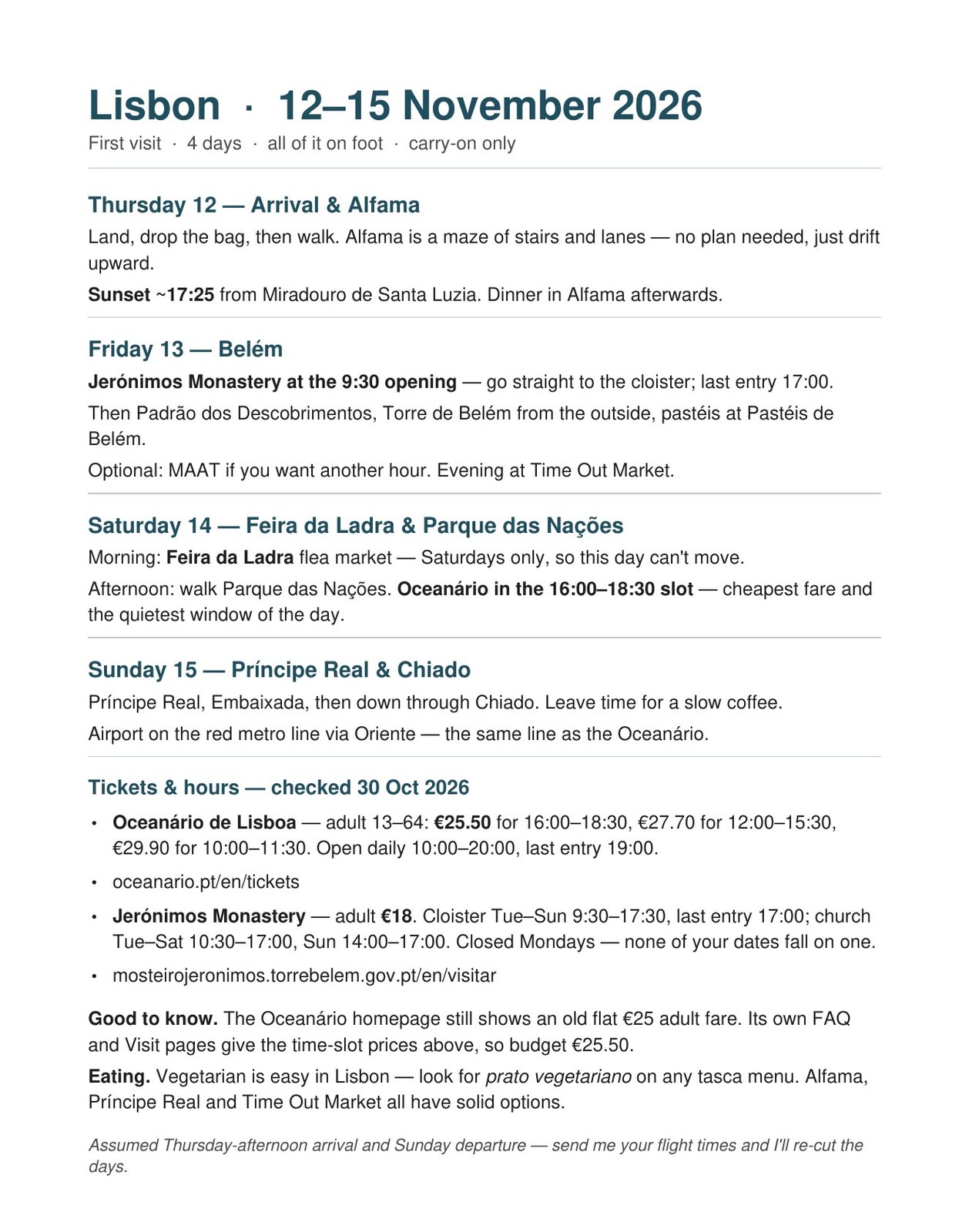
The PDF is a real file in the chat: open it, print it, forward it to whoever travels with you. The agent added two lines nobody asked for. One says the Oceanário homepage still shows an older flat €25 fare while its visit page lists the slot prices, “so budget €25.50”. The other repeats “carry-on only” under the title.
A picture for a story

The size is exactly what a story needs, so it goes in without cropping. Gemini makes pictures on its free plan too; on WAM a picture on the default model costs 20 , and the Free plan’s first month covers about ten of them.
A reminder that arrives on its own
The second message is the test. Nobody asked for it at 18:47: the agent wrote first, in the same chat, between your other conversations. One-off reminders like this work on Free; on Pro the agent also repeats them, for example every Friday before a trip.
A dinner tip that remembered what I eat
The dinner question says nothing about food, yet every answer is vegetarian and “walkable from where you are”. Nine minutes and four other errands earlier the agent had saved three facts; here it used two of them without being told. This is what Gemini’s saved info and Personal Intelligence promise too; in a WAM agent the memory sits in your own container and you change it by asking, for example “forget that I fly carry-on only”.
Before you go, call the restaurant you pick: opening days in Alfama change with the season.
Gemini: what Google’s pages and the reviewers say
We didn’t run Gemini for this article. Everything below comes from Google’s own subscription, release-notes and help pages, read on 30 October 2026, and from hands-on reviews, with links.
The models. On 13 October Google started rolling out Gemini 4 Argon, its new frontier model, to AI Pro and Ultra subscribers. Free users get the Flash-Lite model; AI Plus adds Flash. Since July everyone can also pick 3.6 Flash from the model menu.
Mail and calendar. This is Gemini’s home ground. The Daily Brief reads your Gmail, Google Calendar and past Gemini chats and serves a prioritised list every morning. Ben Patterson at PCWorld had called Google’s personalisation “gimmicky”, then used the Brief for a week and found it “mostly spot-on about catching my key appointments and to-dos”. In September it became free in the US; Google’s page still says “US-only. English-only. 18+.”
Schedules. Gemini can run an action on a schedule, such as a daily digest of your calendar and unread mail. The help page allows up to 10 active schedules and says responses are prepared within the hour before delivery, so “rapidly changing data, like stock prices, won’t be the latest when you receive them.” Google is rolling schedules out to all personal accounts gradually.
Apps and skills. Since 13 October one Customise menu holds skills and more than 40 connected apps, from Instacart to OpenTable. Google notes that most of them work in English in the US. Your own MCP server can be connected as a custom app if you are 18 or over, in the US, on a personal account.
Gemini Spark, the agent. Spark is an always-on agent inside the Gemini app that works with your Google data and its own remote browser. Reece Rogers at WIRED gave it his Gmail, Docs and Calendar and asked for help with a birthday party. It found his real karaoke booking and produced a five-page plan “in just a couple of minutes”; it also listed his live-in boyfriend as “a close friend and frequent companion”, and a remote-browser attempt to book dinner did not go through. In a later one-day test of six agents, Rogers gave Spark the best news angle of the six, while its lunch order for two came back as “a single $5 roll” for his boss. By then Spark came with the $20 plan.
Where the answer lands
Gemini lives in its app, on the web, in the Windows and Mac desktop apps, in Chrome and inside Google’s own apps. You open it, ask, and the answer waits there; the Daily Brief and scheduled actions arrive as notifications from the Gemini app.
A WAM agent is a contact in Telegram, with a name and an avatar you pick. The plan, the PDF, the picture and the reminder above all arrived in one chat, between your other messages. Add the agent to a group and it answers when someone mentions it; give it forum topics and each project keeps its own memory. Forward it a voice note, a screenshot or a PDF and it reads them in the same thread. For ten more errands in this format, see AI chatbot in Telegram: 10 real tasks we gave an agent, with its replies.
What the paid plans add
| Plan | Per month | What it adds |
|---|---|---|
| Google AI Plus | $4.99 | Flash model, double usage, video generation, Gemini in Gmail, 400 GB |
| Google AI Pro | $19.99 | Gemini 4 Argon, four times the usage, Gemini in Docs, Chrome auto browse, 5 TB |
| Google AI Ultra | $99.99 or $199.99 | 5 or 20 times Pro’s usage, first access to Tasks in Gemini, 20 TB |
| WAM Agents Pro | $13.90 | 400 , recurring reminders, scheduled tasks, top-ups, your own Claude or Codex |
Google’s plans are bundles: storage across Gmail, Drive and Photos, Google Flow credits for video, and on Pro a YouTube Premium Lite plan. If you already pay for Google storage, AI Pro may cost you less than it looks. WAM’s Free plan gives 200 in the first month, then 100 a month, no card; Pro is $13.90, or $1.39 for the first month if you subscribe within your first 7 days. With your own Claude or Codex attached on Pro, that work is billed by the provider, not in magnets.
Which one to choose
Choose Gemini if Gmail, Google Calendar and Drive are where your life is, and you want a free assistant that reads them, a morning brief in the US and pictures on the free plan. Choose Google AI Pro if you also want Gemini 4 Argon, video and 5 TB of storage in one bill, and in the US, Spark.
Choose WAM Agents if you want the assistant in the messenger you already use all day, if it should sit in a group with your team, or if you want files, pictures and reminders to come back as messages. It works the same in any country, and it is ready in about a minute: pick a name and an avatar in the bot. More head-to-heads are in WAM Agents vs ChatGPT and ChatGPT alternatives in 2026: what to pick when you need the work done, not a chat.
What the six errands cost
We read the balance in the agent’s status line after each reply. The plan with two price checks took 4 , the PDF 5 , and the picture 34 : 20 is the image itself, the rest went on the agent reading its picture back before sending it and on the conversation so far. The reminder took 1 , and the dinner reply less than a magnet. About 45 for the whole trip, out of the 200 the Free plan gives in the first month.
The published rates put a web search at 1.5 , a generated image on the default model at 20 and 20,000 tokens of text at 1 . Gemini prices by plan rather than by action: Google’s footnotes describe usage limits that grow with each tier, from double the free plan’s on AI Plus to twenty times Pro’s on the top Ultra plan.
Remember this about me for the future: I'm vegetarian, I always fly with carry-on only, and I prefer walking to taxis.
I'm going to Lisbon for 4 days. Make me a day-by-day plan, check today's ticket prices on the official websites and give me the links.
Turn this plan into a one-page PDF I can print.
Draw a picture for my story, vertical 9:16, in a soft watercolour style. No text in the picture.
Remind me in 2 minutes to check in for my flight.
Create your agent, give it a name and an avatar, and send it the first errand from the list above.
Try it with your own agent
Free, no card. The agent starts working in the chat straight away.
Create your AI agentQuestions
Is Gemini free?
Yes. On 30 October 2026 Gemini’s free plan in the US included the Flash-Lite model, image generation, Deep Research, Gemini Live and Canvas. Paid plans: AI Plus at $4.99 a month, AI Pro at $19.99 with Gemini 4 Argon, and AI Ultra from $99.99. Prices differ by country; in the UK AI Pro is £18.99.
Can I use Gemini inside Telegram?
Google lists the Gemini app, the website, the desktop apps for Windows and Mac, Chrome and Google’s own apps as the places Gemini works. If you want an assistant inside Telegram, a WAM agent is a contact there: it answers in your DMs, in group chats and in forum topics.
Is WAM Agents cheaper than Gemini?
Both start free. Google AI Plus at $4.99 is the cheapest paid plan of the two. WAM Agents Pro at $13.90 costs less than Google AI Pro at $19.99, and it is $1.39 for the first month if you subscribe within 7 days of signing up. Google’s plans also bundle cloud storage, which matters if you already pay for it.
Can a WAM agent read my Gmail like Gemini does?
Yes, once you connect Google in the chat with one tap. The agent then triages mail, drafts replies and puts meetings in your calendar, and it shows you the draft and waits for your “yes” before anything goes out. Gemini goes deeper into Google’s own apps: it sits inside Gmail and Docs on the paid plans.
Is this comparison fair? You make WAM Agents.
We make one of the two, and the article says so at the top. We ran the errands only on our own agent and quote its replies as sent. For Gemini we used Google’s subscription, release-notes and help pages, read on 30 October 2026, and hands-on reviews from WIRED and PCWorld, with links.
Which model does a WAM agent run on?
DeepSeek by default, on every plan, with no keys of your own. At onboarding you agree that requests are processed in DeepSeek’s infrastructure in the People’s Republic of China. On Pro you can attach your own Claude or Codex, and that work is billed to your subscription with that provider.