Chat case
AI for documents: send a contract, get the risky clauses, then check the invoice against it

Summarising a PDF is the easy part. The work starts when a document asks something of you: a contract to sign, an invoice to pay. We sent our test agent a two-page website contract and, a few minutes later, the first invoice for it. Four messages produced a list of risky clauses with questions for the studio, a Word file of proposed changes, four mismatches on the invoice and a short email to their accounts team. Below are the real replies, the cost and the point where a lawyer takes over.
The short answer
Send the contract to the agent and say whose side you are on. Ask for the risky clauses with their numbers and the questions to send back. Then ask for a file you can forward: a table with the clause, the current wording, your proposed wording and a reason.
When an invoice arrives, send it to the same chat and ask whether every line matches the contract. The agent has both documents in front of it and checks line by line.
A summary of a document tells you what it says. This guide is about what to do with it. For summaries, quotes and pulling figures out of a PDF, see Twelve things to ask an AI about a PDF.
The test: a bakery, a web studio and two documents
We wrote a sample contract ourselves. A small bakery orders a website from a web studio: eight pages, online ordering, USD 6,400. The contract has eleven sections on two pages, and several clauses lean towards the studio, the way real first drafts often do. A week later the studio sends the first invoice.
The companies are made up. The answers are real: everything below was sent to our test agent on 29 October 2026, on the default model, in one chat.
Step 1. Send the contract and say whose side you are on
“Check this contract” gets a general overview. “We are the Client, what is risky for us” gets a review from your side of the table. Clause numbers make the answer easy to check against the document.
The first reply came in 36 seconds, the questions ten seconds later. The agent ranked the clauses by what they could cost, read them in pairs where they work together (a USD 500 cap plus no liability for delay), and pointed at three things the contract leaves out: the domain, customer data and a bug-fix period after launch. It also caught the smaller items: rates that can change “at any time”, an uncapped hourly rate for extras, a late fee of 0.5% a day and disputes only in the studio's courts.
There were twelve questions in total. Each one names a clause and suggests an answer the studio can accept, which makes a reply more likely than a list of objections.
Step 2. Turn the questions into a file you can send
Questions in a chat are for you. The studio needs a document: what the contract says now, what you propose and why, side by side. Ask for exactly that.
The file took 78 seconds. It is three pages: a short letter, a table of fourteen rows and a closing paragraph that names the two points that matter most. Here is the top of the first page.
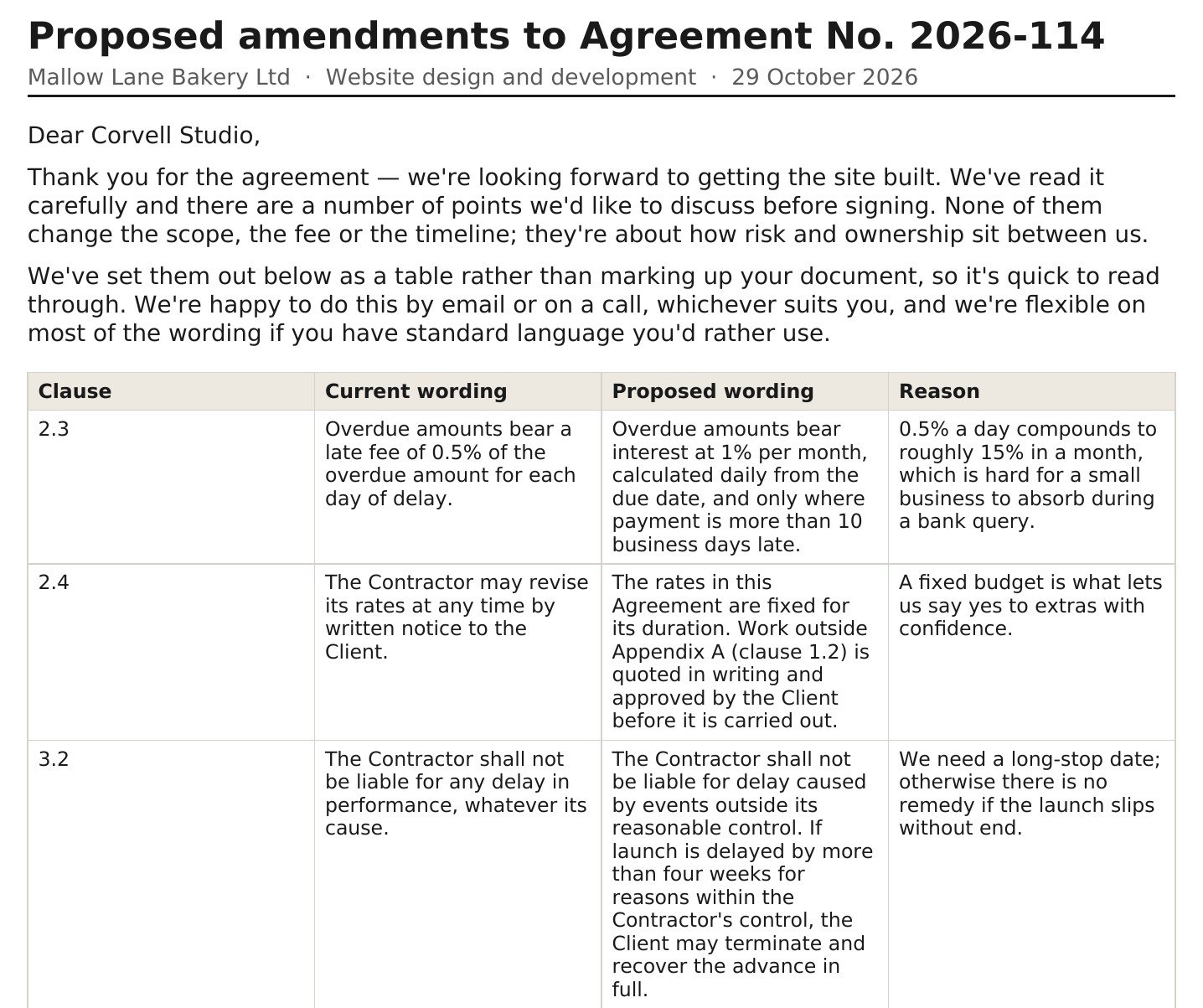
Two details make the file usable as it is. The current wording is quoted word for word, so the studio can find each clause in seconds. And the details only you can supply, the jurisdiction and your contacts, are marked in brackets for you to fill in.
Step 3. Check the invoice against the contract
A week later the first invoice arrives. This is a small, common job: compare every line with what you agreed. The agent already has the contract in the chat, so the request takes one sentence.
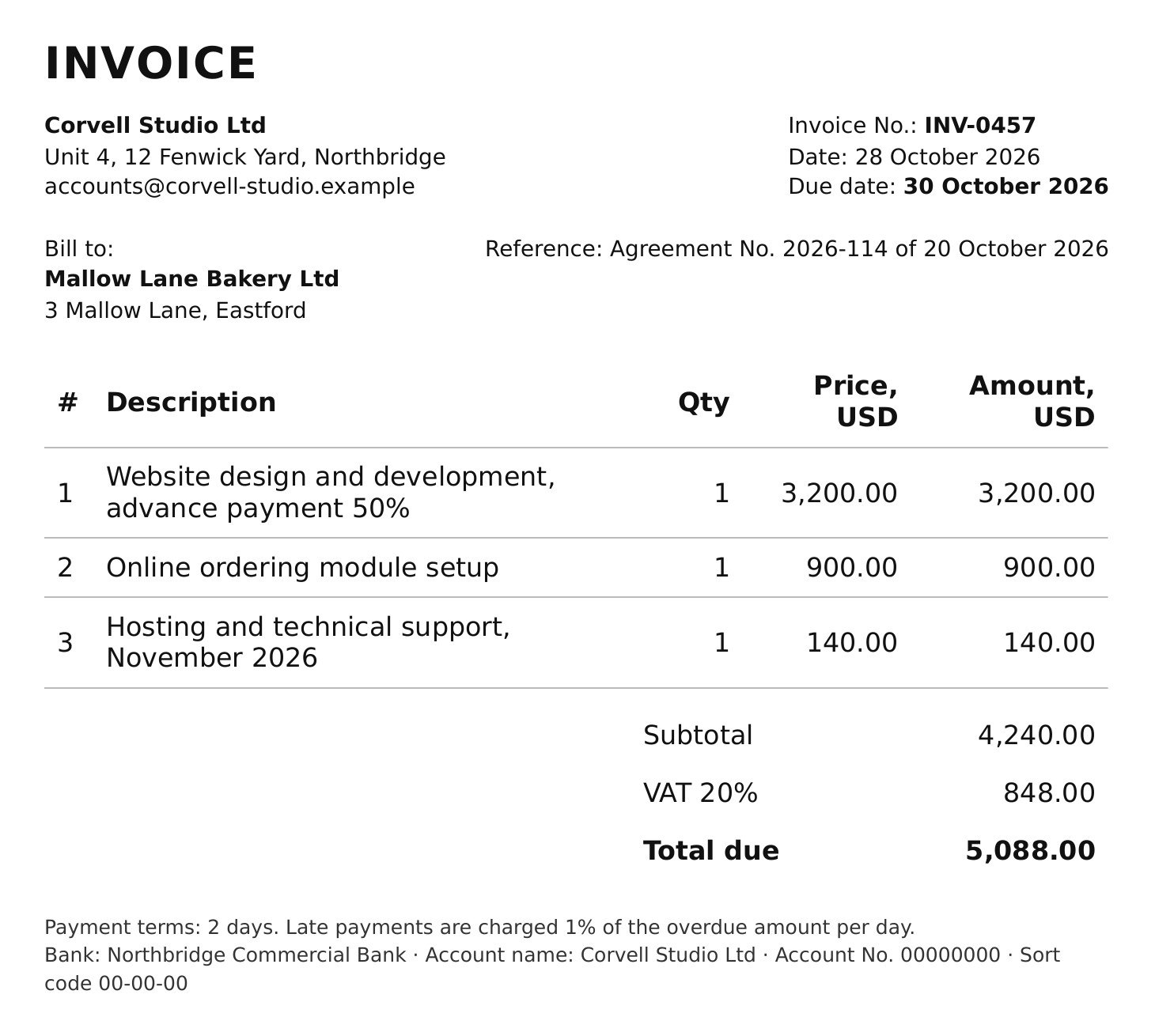
The answer took 18 seconds. Every mismatch comes with the clause that settles it, and the sum adds up: 900 + 140 + 848 = 1,888. Then the agent went past the question. Our sample had placeholder bank details, and it treated them as a payment risk and told us to confirm the account by phone. It also pointed out that paying the advance on the original text would read as accepting the clauses still under discussion.
Step 4. Write the reply to accounts
The last step is the message itself. Ask for the length and the tone you want.
Sixteen seconds. The email asks for one thing, a corrected invoice, and gives three reasons with clause numbers. The agent also explained what it left out and why, so you decide whether to add it.
With Gmail connected, the same chat can send the email from your own mailbox. The agent shows the draft first and sends after your “yes”.
Where a lawyer comes in
Your chat history, with the documents you send, stays in your agent's isolated container. To answer, the agent sends requests to the model: on the default model they go through DeepSeek's infrastructure in the People's Republic of China, which you confirm during onboarding, and on Pro you can attach your own Claude or Codex, so requests go to that provider under your own account. If a contract has a confidentiality clause, this is what to match it against. How the agent handles data and access is covered in Is an AI agent safe? 8 things to check before you let one into your chats.
What it costs
We read the balance in the agent's status line before and after each message. The contract review cost about 1 , the Word file about 5 , the invoice check about 6 and the email about 1 . That is about 13 for the whole case.
Text work on the default model costs 1 per 20,000 tokens, and a photo or screenshot of a page costs 1.5 to read. The Free plan gives 200 in the first month and 100 every month after, with no card. Pro costs $13.90 a month for 400 , or $1.39 for the first month if you subscribe within 7 days of signing up. All rates are on the pricing page.
Messages worth copying
We are the Client in this contract. Which clauses are risky for us? Point to clause numbers and give me the questions to send back.
Make a Word file I can send to the other side: clause, current wording, our proposed wording, one-line reason. Keep it polite.
Here is the invoice for this contract. Does every line match what we agreed? List anything that doesn't, with the clause.
Write a short email asking for a corrected invoice: what we'll pay now and what needs fixing. Three or four sentences.
What does this contract leave out that a contract like this usually covers?
Create your agent, send it the next contract before you sign, and keep the invoice for the same chat.
Try it with your own agent
Free, no card. The agent starts working in the chat straight away.
Create your AI agentQuestions
Can an AI agent review a contract?
It can read the whole contract, list the clauses that work against your side with their numbers, explain each one in plain words and draft the questions and changes to send back. In our test it found the risky clauses in a two-page agreement in under a minute. Whether to sign is still a decision for you and, on the big clauses, for a lawyer.
Which files can I send?
PDF, DOCX and TXT files, sent or forwarded like any file in the chat. The agent also reads photos and screenshots of pages, so a paper invoice works as a photo.
Can it check an invoice against a contract?
Yes, if both are in the same chat. Send the contract first, then the invoice, and ask whether every line matches. In our test the agent matched each line to a clause and found four mismatches worth USD 1,888.
Can it give me a file I can send to the other side?
Ask for the format you need. We asked for a Word file with four columns: clause, current wording, proposed wording, reason. The agent sent it in the same chat with a short cover letter on top.
Is this legal advice?
No. The agent flags risks and drafts wording, and it said so itself in both replies about the contract. For liability caps, termination and penalties, an hour with a lawyer before you sign is the safe route.
How much does it cost?
Our four exchanges cost about 13 in total. The Free plan gives 200 in the first month and 100 every month after, with no card.