Chat case
AI for spreadsheets: send three Excel exports, get one Google Sheet for the team and three conclusions

Month end, three exports that do not talk to each other, and a meeting with the owner on Monday. We sent our test agent three Excel files from a six-person sales team: deals from the CRM, the phone system report and invoices from accounting. Three minutes later a Google Sheet was in the chat, one row per manager. Four more messages gave three conclusions, the list of unpaid invoices and a note for the owner. Below are the real replies, the cost and the requests to copy.

The short answer
Export the files you already have, send them to your AI agent in Telegram as one message and write what you need: “one table, a row per manager: plan, closed, paid, calls, win rate”. Add the plan if it lives only in your head. The agent reads the Excel files, matches the same people across them, builds the summary in Google Sheets and sends you the link.
Then keep asking in the same chat, the way you would ask an analyst. What should the owner take away? Where is the money we closed but did not collect? Can you put that on a separate tab? Each answer takes under a minute, because the agent already has all three files.
That is what “AI for Excel” means in practice: you skip the copying, the lookups and the matching of names. You keep the judgement.
The test: October numbers of a six-person sales team
We made the data ourselves, the way three different systems would hand it to a sales manager. Brightline Supply is an invented B2B distributor of office and cleaning supplies. Claire runs a sales team of six: Ethan, Marcus, Priya, Sofia, Tom and Nina, who joined in September. On Monday she meets the owner and needs October on one page.
Her October lives in three files, and they do not talk to each other:
- CRM_deals_October_2026.xlsx, 117 deals: owner by full name, client, amount, won or lost, the reason for a loss;
- calls_report_2026-10.xlsx, 122 rows from the phone system: one row per person per working day, people by login, calls out, calls answered, talk time;
- Invoices_payments_Oct2026.xlsx, 51 invoices from accounting: client, amount, due date, paid or open. There is no manager column at all.
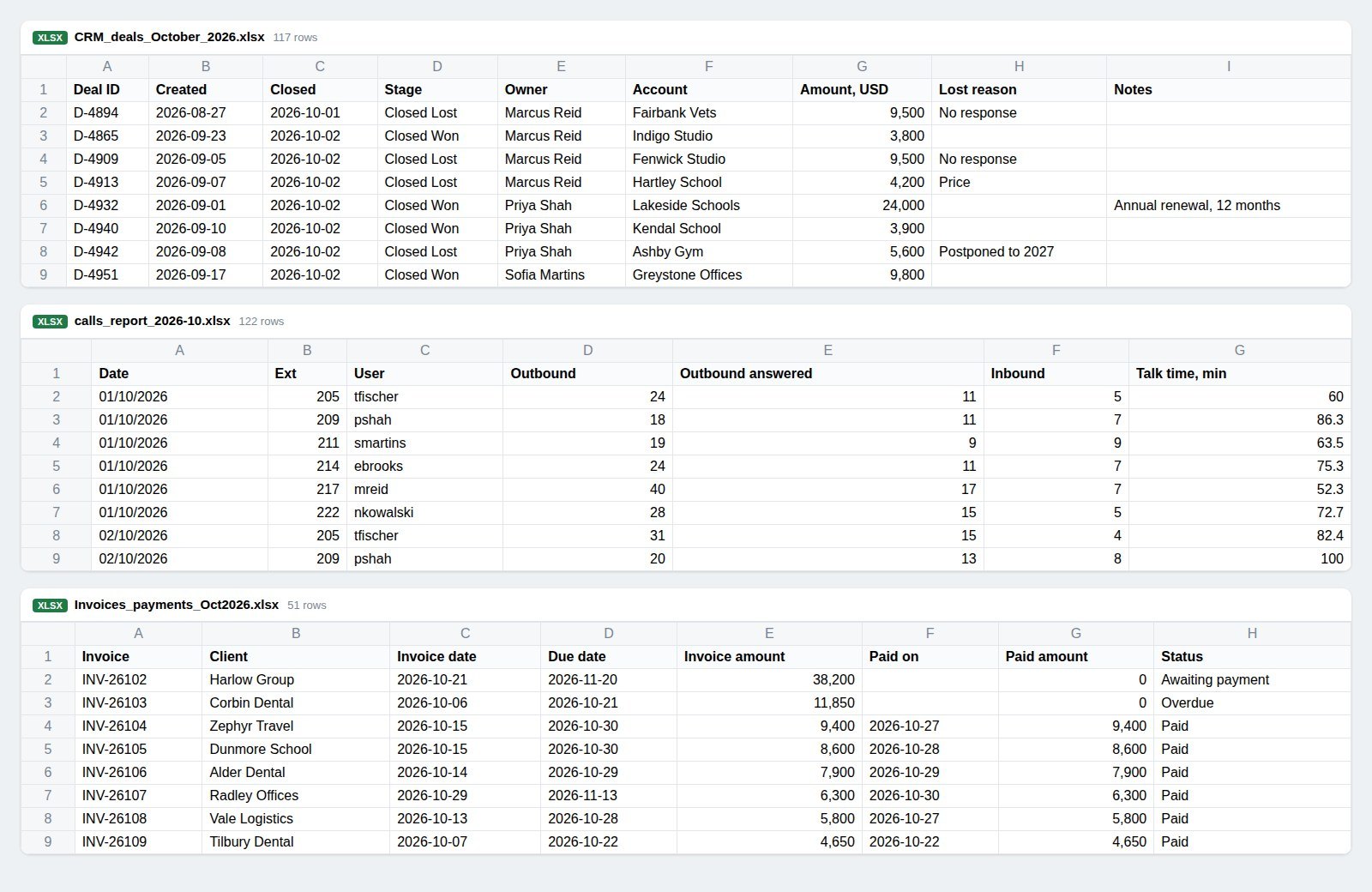
That is the usual month-end mess. To put “paid” next to a manager, someone has to match each invoice to a client and each client to a deal owner. To put calls next to deals, someone has to know that mreid is Marcus Reid. We also planted things a good analyst should notice and did not mention them to the agent: one large deal that makes a single manager look like a star, invoices that are already late, a manager with four times the calls and the lowest win rate, and two weeks with no calls from Priya, who was on leave.
We sent the three files to our test agent in Telegram on 30 October 2026, with Google connected. The company and the people are invented. The agent's answers are real and quoted as they came; we shortened two replies and removed the sheet links.
Step 1. Send the three files and describe the table
The request names the source of each file, gives the plan, lists the columns and asks for Google Sheets.
The sheet came 2 minutes 56 seconds after the files, with the link at the top of the reply. It was a new file in the Drive of the connected Google account, called “October 2026 — Sales Team Scorecard”.
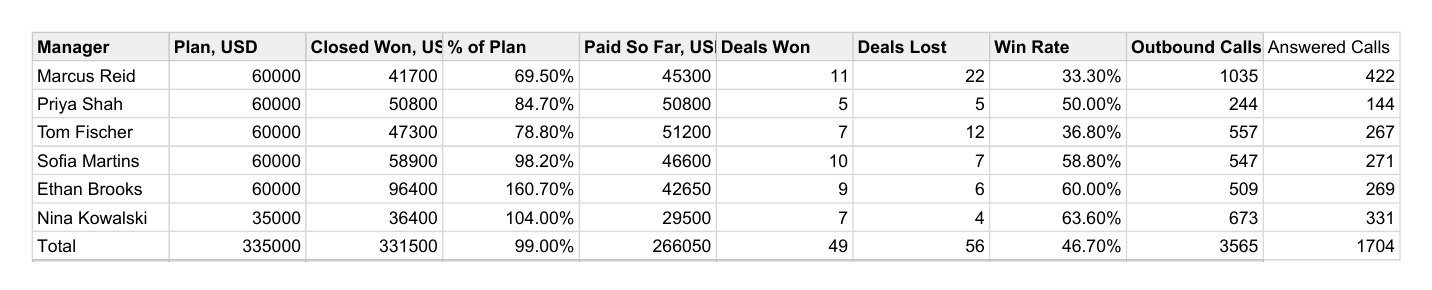
We checked the sheet against the source files cell by cell, and every number matched: closed won per manager, deals won and lost, win rates, calls. The team total is $331,500 against a $335,000 plan, 99%.
The hard part of this task is the matching, and the agent did it without being asked how. The phone report knows people only as logins, and the agent put each login on the right row. The accounting file has no manager column, so the agent took each invoice's client, found that client in the CRM and credited the payment to the deal owner. It wrote that rule on the Notes tab, next to the period, the sources and the definitions of every column.
The same tab carries four data flags. Two of them matter right away. Priya appears in the phone report on only 12 of 22 working days, so her call numbers cover part of the month. And two paid invoices sit on clients that the CRM shows as lost in October. In our files those were September invoices paid in October, a detail that lives outside the three exports. A flag like this is a one-minute question for you, and exactly what you want to see before the owner does.
The one-line ranking in the chat is a bonus we did not ask for. It already reads like the opening of a meeting: Ethan at 160.7% “but only $42,650 collected”.
Step 2. Ask for the three conclusions
The first reply delivered the table. The conclusions came with a short follow-up.
Nineteen seconds. These are three findings, and none of them is a restatement of the table.
The 160% is one deal. The table says Ethan is far ahead. The agent took his largest deal out and showed that without it he sits at 97%, “like everyone else”. A manager who presents the 160% on Monday gets the follow-up question from the owner. A manager who presents this gets ahead of it.
Closed is not cash. The agent found the gap the CRM hides: $75,750 closed but not paid, half of it in one person's deals, one invoice already late. It joined three files to get there, because the CRM has the owner and accounting has the payment.
Activity is not results. Marcus makes four times Priya's calls and wins a third of his deals at a third of her deal size. The agent also read the loss reasons: 14 of Marcus's 22 losses are “No response”, which points at the call list rather than the pitch. Every planted pattern except Priya's leave made it into the conclusions, and the leave was already flagged in the sheet.
Each conclusion comes with an action, and the closing line is something Claire can say out loud in the first minute of the meeting.
Step 3. Find the money that has not arrived
Conclusion two is the one the owner will ask about, so we asked for the detail.
Forty-two seconds. All seven invoices, amounts, owners and due dates match the accounting file, and “nine days late” and “two days late” are right for 30 October.
The most useful part of the first reply is the one where the agent corrects itself. With the dates in front of it, it went back to its own conclusion: every one of the 44 paid invoices was paid on time, so collection works, and the open money is mostly money that is not due yet. That changes what Claire says on Monday. She talks about two late invoices and one long payment term, and keeps the team's collection record as a strength.
The agent also spotted the payment terms on its own. Harlow Group, the largest invoice, is the only one on 30 days instead of 15. That is a question about how the deal was negotiated, and it surfaced from a column nobody asked about.
Step 4. A note for the owner and a Collections tab
Last, a message Claire can send before the meeting, so the owner arrives with the numbers already read, and the invoice list as a tab in the same sheet.
The note took 41 seconds, the new tab about a minute. Numbers first, then one action per problem, each with a name and a day: payment dates by Tuesday, commission on cash, a review of Marcus's lost deals. The agent carried its own correction from step 3 into the note and explained why the “bottleneck” line is gone.
Two lines in the draft are still Claire's call. Priya was on leave for two weeks, which is in none of the three files, so “fixing her logging” becomes “Priya was on leave 12–23 October”. And the two “CRM stages” are September invoices, as we saw in step 1, so that sentence goes. This is why the draft is a draft: the agent writes from the files, and you add what only you know. One line in the first request (“Priya was on leave 12–23 October”) would have put it in the table from the start.
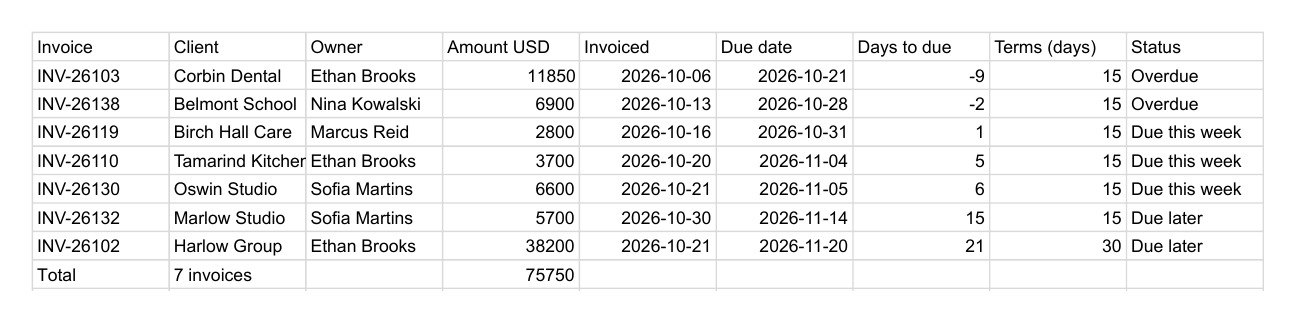
The Collections tab went into the same spreadsheet, after the scorecard and the notes, so the owner gets one link with everything.
What came out of three files
Five messages and about six minutes of waiting gave Claire:
- a Google Sheet with one row per manager: plan, closed, % of plan, paid, deals, win rate, calls;
- a Notes tab with sources, the matching rule and four data flags;
- three conclusions for the owner, each with an action;
- a list of the seven open invoices, the two late ones, and a payment term worth asking about;
- a Collections tab in the same sheet;
- a note for the owner, ready to edit and send.
Nobody copied a cell or wrote a lookup formula. The three exports went in once.
Habits that make the summary safe to forward
Give the plan and anything the files cannot know. Plans live in heads more often than in exports. One line (“plan is $60,000 per manager, Nina's is $35,000”) gives the agent the denominator. Add leave, a new territory or a price change the same way, and the conclusions start from the full picture.
Name the system behind each file. “Deals from the CRM, the phone system report, invoices from accounting” tells the agent which file is the source of truth for what, and helps it match people whose names differ between files.
Read the data flags first. The agent lists what looked odd: missing days, payments on lost deals. Each one is a quick question for you. Answer it, and the agent updates the table and the conclusions in the same chat.
Spot-check one number per file. Pick one manager and compare one cell against each source: closed won from the CRM, calls from the phone report, paid from accounting. Thirty seconds, and you can stand behind the whole table.
Ask for the conclusions separately. The first reply builds the table. A second message (“three conclusions, and what would you do about each”) gets the agent to argue with the numbers, which is where the useful part starts.
Keep next month in the same chat. The agent remembers what you sent and how the table was built. In November you send three new files and write “same summary as October, plus the change against October”.
What it costs
We read the balance in the agent's status line after each message. Reading the three files and building the Google Sheet cost 10 . The conclusions and the invoice breakdown cost 1 each, the owner note and the Collections tab 2 each. That is 16 for the whole case.
Text work on the default model costs 1 per 20,000 tokens. The Free plan gives 200 in the first month and 100 every month after, with no card: a monthly summary like this one fits many times over. Pro costs $13.90 a month for 400 , or $1.39 for the first month if you subscribe within 7 days of signing up, and adds scheduled tasks, such as a reminder on the first working day of each month to send the exports. All rates are on the Pricing page.
Your files and chat history stay in your agent's isolated container, and the sheet is created in your own Google Drive after you connect Google. To answer, the agent sends requests to the model: on the default model they go through DeepSeek's infrastructure in the People's Republic of China, which you confirm during onboarding, and on Pro you can attach your own Claude or Codex, so requests go to that provider under your own account. The Subprocessors page lists every outside service.
When the month becomes a quarter, the same chat turns the numbers into slides: see AI for presentations: send a spreadsheet, get a quarterly report deck for the owner. If the meeting with the owner is recorded, AI meeting minutes: send the recording of a team call, get decisions, owners and deadlines shows how to turn it into tasks.
Messages worth copying
Here are [N] exports: [what each file is]. Build one summary table in Google Sheets, a row per [manager / store / project]: [columns]. Plan is [number]. Send me the link.
Say how you matched people and clients across the files, and list anything that looks odd in the data.
Give me three conclusions for a meeting with the owner and what you would do about each.
Which invoices are still open, whose are they, and which are overdue as of today, [date]?
Add a tab with [list] to the same sheet, keep the summary as the first tab.
Write a five-line note for the owner: numbers first, then what I'm doing next week.
Create your agent, export last month's files and send them in one message before your next meeting with the owner.
Try it with your own agent
Free, no card. The agent starts working in the chat straight away.
Create your AI agentQuestions
Can an AI read Excel files and build a summary?
Yes. Send the .xlsx files to your agent in the chat and say what the summary should show. In our test the agent read three exports at once (117 deals, 122 rows of call data, 51 invoices) and built a Google Sheet with one row per manager in under three minutes.
What if the files describe people in different ways?
That is the normal case, and the agent handles it. Our CRM had full names, the phone system had logins like “mreid”, and accounting had only client names. The agent matched logins to people and invoices to deal owners through the client, and wrote that rule into the sheet. Ask it to state the matching rule in the reply, so you can check it in a few seconds.
Does it create the table in Google Sheets or send a file?
Both work. After you connect Google with one link, the agent creates the sheet in your own Drive and sends you the link, and it can add tabs to the same sheet later. If you prefer a file, ask for .xlsx and it comes back in the chat.
Will the numbers be right?
We checked every figure in the summary against the source files, and they matched. Treat the agent's summary like an analyst's draft: spot-check one number per file and read its data flags before the table goes to the owner.
Can it do this every month on its own?
On every plan you send the new exports and write “same summary as October”. Pro adds scheduled tasks, for example a reminder on the first working day of the month to send the three files, or a weekly check of the sheet.
How much does it cost?
Our five messages cost 16 in total: 10 for reading three files and building the sheet, 6 for the conclusions, the invoice breakdown, the owner note and the extra tab. The Free plan gives 200 in the first month and 100 every month after, with no card.