Guide
AI agents for small business in plain words: three jobs from a flower shop's week, before and after

An AI agent for a small business is easiest to understand by the jobs it takes off your week. We gave our test agent three that every small shop knows: a weekend of unanswered customer messages, two wholesale price lists that need comparing, and a batch of reviews. Below are the real chats, the time each answer took, what the agent got right without being asked, and what stays with you.

The short answer
An AI agent is an assistant you hand whole jobs to in a chat. You don't build a workflow or learn a tool. You write what you need, the way you would to a new person in the shop, and it comes back with the result: replies ready to send, a spreadsheet, a worked-out order, a reminder at the right time.
For a small business, the useful jobs are the small, repeated ones that eat the evenings: messages that piled up, price lists to compare, reviews to answer. In our test the agent took three of them in one conversation and finished each in under three minutes. It also caught two things we didn't ask about: a customer whose budget didn't cover the bouquet she wanted, and the same unhappy customer writing twice, once on WhatsApp and once in a review.
The test: a flower shop in Porto and its backlog
The shop is made up: Marta runs it with two florists and a courier. The work is the kind every small shop has. The replies are real: we sent these messages to our test agent on WAM Agents on 30 October 2026, on the default model, DeepSeek, and quote the answers as they came. We cut a few lines and added nothing.
Each job below starts with how it usually goes by hand, then the chat, then what came back and how long it took. The time is measured from the moment the message reached the agent to the moment the answer arrived.
1. Weekend messages: six replies and an order sheet
Before. Six messages over the weekend, in four apps: a birthday order, a delivery question, a hotel asking for a quote, a complaint, a repeat customer who has already paid, and a stranger asking about holiday hours. You answer them one by one, work out prices in your head, and copy the details into a notebook or a spreadsheet so the florists know what to make. The complaint waits until you find the right words.
After. You paste all six into one message, add your prices once, and ask for two things.
The replies arrived 48 seconds after the message, and the spreadsheet three seconds later: 51 seconds in all. Every price checks out against the list in the message. €35 for a small peony bouquet is €25 plus the €10 import surcharge, the twelve centrepieces start at €420, and Matosinhos delivery is €10.
The useful part is what the agent noticed on its own. Inês said “budget around 50”, and the agent worked out that €50 only covers a small peony bouquet with delivery (€42), while a medium one comes to €57, so it left the choice to her instead of quietly picking a size. It turned “Tuesday” and “Thursday” into dates. And it wrote the complaint reply without excuses, with a concrete offer that you can keep or change.
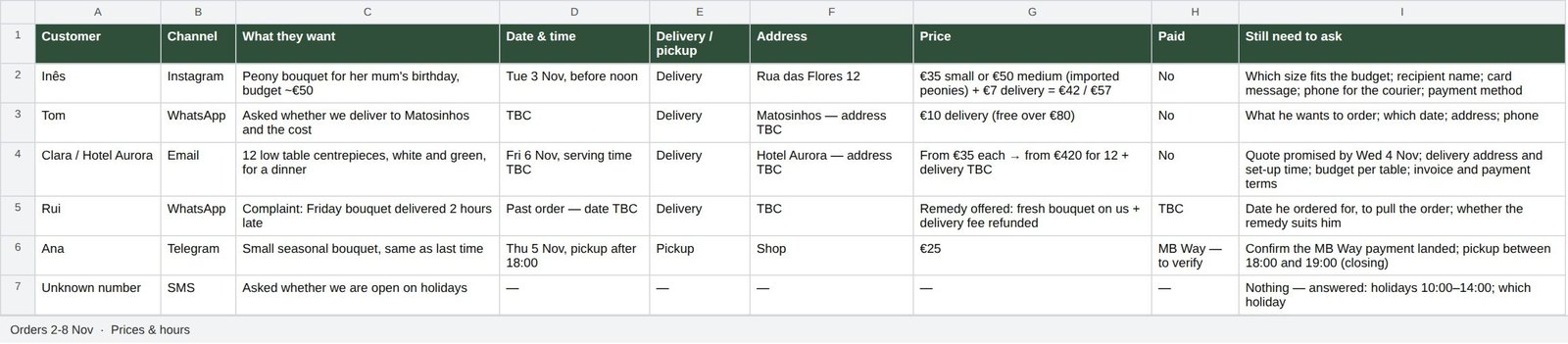
The order sheet is a real .xlsx file with one row per message and a last column, “Still need to ask”, that doubles as your to-do list for the morning: the card message for Inês, the address for the hotel, a check that Ana's MB Way payment landed.
2. Two wholesalers, one order
Before. Two price lists with different pack sizes, a minimum order on one side and a free-delivery threshold on the other. You round up each flower to full packs, add up both baskets, try a split or two and then type the order twice. It is pure arithmetic, and it lands at the end of a long day.
After. You paste both lists and the week's needs and ask for the cheapest way to buy.
This one took 2 minutes 27 seconds, the longest of the three, and it is the one where checking matters most, so we redid the sums. Every line is right: €216.40 at Verde Grossista with free delivery, €223.00 at Flora Norte including €15 delivery. We also ran every way of splitting the five flowers between the two suppliers with a short script. None comes out cheaper than one order at Verde. The cheapest split costs €239.40.
Look at how the agent counted. It rounded each flower up to whole packs and listed the spare stems that come with them. It noticed that the Flora Norte minimum pushes you to overbuy and that two orders mean two delivery fees. It answered the timing question too: a Monday delivery clears the Tuesday 11:00 deadline for the peonies. Then it wrote both order messages, so whichever way you go, you paste and send.
3. Reviews: eight replies, what repeats, and a reminder
Before. Eight reviews from the month, three of them unhappy. You answer the easy ones, put off the hard ones, and the pattern behind them (late deliveries, a missing card) stays a feeling rather than a list.
After. One message: replies for all eight, the problems that repeat, and a reminder for Monday morning.
The eight replies came 23 seconds after the message, and the list of problems with the reminder 8 seconds later. Each reply names something specific from the review: Sofia and the colours, the tulips that lasted ten days, the calm on a wedding day. None of them reads like a template.
Two details show the agent kept the whole conversation in mind. It recognised Rui M. from the reviews as the same Rui who complained on WhatsApp in the first job, and suggested answering him once. And in the list of problems it connected Sara's two-day wait on Instagram with the six messages that sat over the weekend: the same problem twice. The reminder for Monday at 9:00 is set, a one-off reminder that works on every plan.
Before you post the replies, read them for promises. The agent wrote a few changes as if they were already done, such as checking Instagram twice a day. Post those lines once they are true, or ask the agent to phrase them as plans.
What the three jobs show about agents
Put side by side, the three jobs explain an AI agent better than a definition does.
- It works from what you give it. Prices, pack sizes and opening hours went in once, in plain words, and every answer used them.
- It does the arithmetic and shows it. Each total came with the lines behind it, so checking took a minute.
- It hands back files and finished text. An .xlsx order sheet, order messages ready to paste, review replies signed with your name.
- It remembers the conversation. The second job used the peony order from the first, and the third linked a review to a WhatsApp complaint.
- It asks instead of guessing. Bouquet size, the hotel's address, Rui's order date: each open question ended up in the reply or in the sheet.
- It acts on time. The reminder is in place for Monday morning, and on Pro the same works for recurring reminders and scheduled tasks.
All three ran in the chat where you already talk to people. The agent is a contact in Telegram, it works in your DMs and can join groups and forum topics as a participant, and other messengers can be connected.
How an agent differs from a chatbot or an automation tool
A website chatbot answers your customers from a script. An automation tool moves data between apps along a path you drew in advance. Both are useful, and both need you to know the steps before they run.
An agent works the other way round. You describe the result and it chooses the steps: read the messages, count the stems, write the file, set the reminder. When something is unclear, it asks, the way it asked about the bouquet size and the hotel's address. In WAM Agents, each person gets their own agent with a name and an avatar they choose; it keeps its memory and files in an isolated container, and its skills can be edited in plain words.
That is the whole difference. A chatbot answers questions, an automation repeats the same steps, and an agent takes a job and brings back the result.
Where else it takes work off a small business
The three jobs above are a start. If you run a small team, the same agent turns a call recording into decisions and deadlines: see AI meeting minutes: send the recording of a team call, get decisions, owners and deadlines. Quarterly numbers become a report deck for the owner in AI for presentations: send a spreadsheet, get a quarterly report deck for the owner. For contracts and supplier invoices, read AI for documents: send a contract, get the risky clauses, then check the invoice against it. Ten everyday errands, from a reminder to splitting a bill, are in AI chatbot in Telegram: 10 real tasks we gave an agent, with its replies.
Tips before you hand over your own jobs
- Give it your numbers once. Prices, delivery zones, opening hours, minimum orders: put them in the first message and the agent uses them for everything after.
- Ask for the file you would make anyway. If you would keep it in a spreadsheet, ask for the spreadsheet.
- Ask it to show the totals. “Show me the totals so I can check them” costs one line and makes every figure checkable.
- Keep the last word on anything that leaves the shop. The agent drafts replies, orders and review answers; you read them and press send.
- Keep each stream of work in its own topic. A forum topic keeps its own memory, so supplier orders don't mix with customer replies.
What it costs
The agent's work is paid in magnets (). Free gives you 200 in the first month and 100 every month after, with no card. Pro costs $13.90 a month with 400 , or $1.39 for the first month if you subscribe within 7 days of signing up, and adds recurring reminders, scheduled tasks and magnet top-ups.
On the default model, 20,000 tokens of text cost 1 . The three jobs in this article, with the spreadsheet and the reminder, took 9 together, read from the balance in the agent's status line. All rates are on the pricing page.
Messages worth copying
Here are the messages that came in over the weekend. Draft a reply to each in my voice and make me an order sheet as a spreadsheet: customer, what they want, date, delivery or pickup, address, price, paid or not, what I still need to ask.
Here are two suppliers' price lists and what I need this week. Work out the cheapest way to order, counting pack sizes, minimum order and delivery. Show me the totals, then write the order messages.
Here are this month's reviews. Write a short personal reply to each, then tell me which problems repeat and what to change this week.
Remind me on Monday at 9:00 to post the replies.
Create your agent and send it the first job from your own week.
Try it with your own agent
Free, no card. The agent starts working in the chat straight away.
Create your AI agentQuestions
What is an AI agent, in plain words, for a small business?
An assistant you give whole jobs to in a chat, the way you would to a new employee. You describe the result, for example “reply to these six messages and make me an order sheet”, and it reads, counts, writes the file and asks you about anything unclear. With WAM Agents it is a contact in your Telegram with a name and an avatar you choose.
Do I need to set anything up or connect my systems first?
No. The three jobs in this article started from messages pasted into the chat. You create the agent in Telegram and send the first task. Gmail, Google Calendar and other tools connect later through MCP if you want the agent to work with them directly.
How much time does it actually save?
We only quote what we measured. In our test the replies and the order sheet came back in 51 seconds, the supplier comparison in 2 minutes 27 seconds and eight review replies in 23 seconds. How long the same work takes you by hand depends on your shop, so time yourself once and compare.
Will it send messages to my customers on its own?
In these jobs it drafts and you send. That is the way we recommend starting: you read the replies, the order and the review answers, then paste or post them yourself.
How much does it cost a small business?
Free gives 200 in the first month and 100 every month after, no card. Pro costs $13.90 a month with 400 , or $1.39 for the first month if you subscribe within 7 days. The three jobs in this article took 9 together on the default model.
Where does my business data go?
By default requests go through DeepSeek infrastructure in the People’s Republic of China; you confirm this during onboarding. Your chat history and files stay in your agent’s isolated container, and WAM Agents does not use your content to train models. On Pro you can attach your own Claude or Codex instead.